

Etiquetas de Material en Revit
Resolver los signos de interrogación
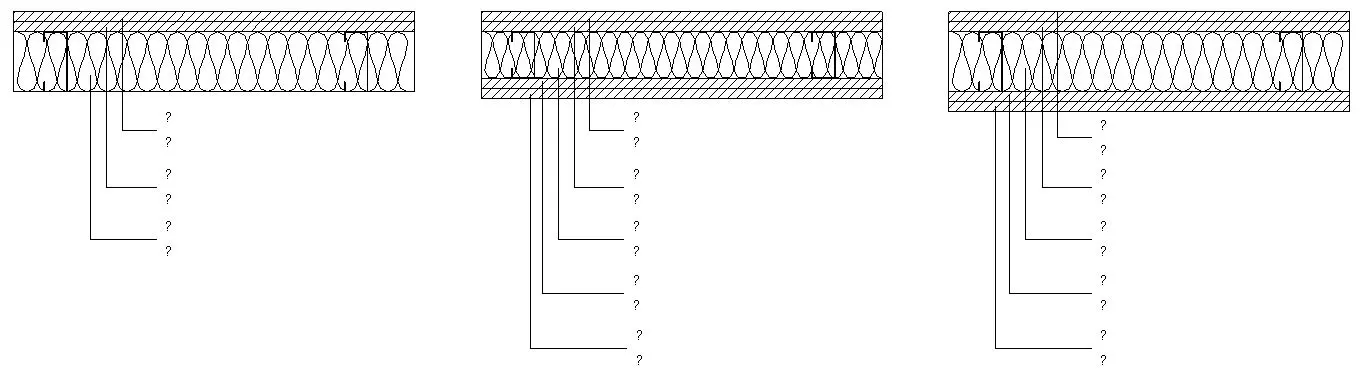
Descripción
El siguiente código arregla el bug de Revit que dejaba algunas etiquetas de material con un signo de interrogación (?). El problema era conocido pues lleva unos años dándose y la única solución consistía en mover ligeramente la etiqueta antes exportar o imprimir
public void MaterialTagFix()
		{
			UIDocument uidoc = this.Application.ActiveUIDocument; //Get active document
			uidoc.RefreshActiveView(); //Refresh the view - Unnecessary
			List noIDs = new List();
			List tags = new List();

			List mtags = new List();
			List pinnedtags = new List();
			noIDs.Add(ElementId.InvalidElementId); //create a null selection for later use

			List selectedIds = new List(); // a list for selected elements

			foreach (Element e in new FilteredElementCollector(Document).OfCategory(BuiltInCategory.OST_MaterialTags).OfClass(typeof(IndependentTag))) //collect material tags in the document
			{
				tags.Add(e); //store in list of tags
				selectedIds.Add(e.Id); //store the tag ID in the list for selecting items
			}

			List views2open = new List(); // a list for views to be opened


			foreach (Element tag in tags) //find the containing view for all material tags
			{
				IndependentTag itag = tag as IndependentTag;
				if (itag != null)
				{
					ElementId vid = itag.OwnerViewId;
					if(!views2open.Contains(vid))
					{
						views2open.Add(vid); //add the view to the list only if does not exist
					}
				}
			}

			View startingView = uidoc.ActiveView; //store the starting view as a courtesy to the user

			foreach (ElementId v2oId in views2open) //open all views containing material tags
			{
				View v2o = Document.GetElement(v2oId) as View;
				if (v2o != null)
				{
					uidoc.ActiveView = v2o; //get the view ID and set it as active

					UIView uiview = null;
					IList uiviews = uidoc.GetOpenUIViews();

					foreach( UIView uv in uiviews ) //get the corresponding UIview to the opened view
					{
						if( uv.ViewId.Equals( v2oId ) )
						{
							uiview = uv;
							break;
						}
					}

					if(null != uiview) //if corresponding UIview exists, set the UIview zoom to the view's crop
					{

						BoundingBoxXYZ crop = v2o.CropBox;
						XYZ p = crop.Min;
						XYZ q = crop.Max;
						uiview.ZoomAndCenterRectangle( p, q );
					}

					uidoc.Selection.SetElementIds(selectedIds); //select all material tags
					uidoc.RefreshActiveView(); // refresh the view
					uidoc.Selection.SetElementIds(noIDs); // clear the selection
				}
			}
			//
			// The following block can be used to actually nudge the tags, only if select and deselect does not work.
			// Be careful because elements might be pinned or non-editable.
			//
			/*
			XYZ v1 = new XYZ(0.01*MeterToFeet,0.01*MeterToFeet,0); //vector to nudge the tags a little bit to the right
			XYZ v2 = new XYZ(-0.01*MeterToFeet,-0.01*MeterToFeet,0); //vector to nudge the tags a little bit back to the left

			using (Transaction tx = new Transaction(Document))
			{
				tx.Start("Move Tags");

				foreach(Element etag in tags)
				{
					if(etag.Pinned)
					{
						pinnedtags.Add(etag); // register pinned tags
						etag.Pinned = false; // unpin pinned tags
					}
					if (etag.Location.Move(v1)) // if move was successful
					{
						mtags.Add(etag); // register the tag as moved so you can revert the change
					}
				}
				tx.Commit(); // commit, a refresh is triggered
			}

			using (Transaction tx = new Transaction(Document)) //undo the previous transaction moving back the tags
			{
				tx.Start("Move Tags Back");

				foreach(Element etag in mtags)
				{
					if (etag.Location.Move(v2))
					{
						//mtags.Add(etag);
					}
				}

				foreach(Element ptag in pinnedtags)
				{
					ptag.Pinned = true; // re-pin tags
				}

				tx.Commit();
			}*/

			uidoc.ActiveView = startingView; // set the view back to the starting view
			uidoc.Selection.SetElementIds(selectedIds); // select and refresh, because why not?
			uidoc.RefreshActiveView();
			uidoc.Selection.SetElementIds(noIDs);

			if(views2open.Contains(startingView.Id)) // if the starting view contained tags
			{
				views2open.Remove(startingView.Id); // remove it from the list as we want to close all of them, just a courtesy to the user
			}
			bool closeviews = true; // set to false in case you don't want to close the views
			if(closeviews)
			{
				foreach (UIView openview in uidoc.GetOpenUIViews())
				{
					if(views2open.Contains(openview.ViewId))
					{
						openview.Close(); // close the views that were opened by the macro
					}
				}
				uidoc.ActiveView = startingView; // set the the view back to the starting view - redundant
			}
		}
		const double MeterToFeet = 3.2808399;
Puedes añadir el método en el Startup Module de las macros de tu archivo para arreglar el problema automáticamente cuando se abra el documento.
Plataforma
Revit.
Tipo
Revit API Macro.