

Cómo extraer mediciones en un proyecto BIM
Cómo extraer mediciones en un proyecto BIM
How to perform Quantity Take-Off in a BIM project
Objective
This document aims to provide key information to be taken into account when doing quantity take-off in BIM models for the purpose of linking it to budget line items.
Introduction
A BIM model is a container of information that we can also use to do quantity take-off as long as it is properly set up for it. We are talking about the 5D dimension of BIM, which seeks to control costs. Quantity take-off in a BIM project does not only involve the modeled information, but to control the entire take-off, including non-modeled elements, with other available resources.
To do so, we must be very clear about the strategy we are going to apply and the factors we need to consider to define it.
Strategy
First of all, it should be noted that the strategy for quantity take-off depends directly on the modeling strategy. Which elements will be modeled and in what way and, on the contrary, which elements will not be modeled, will have a direct and major impact on the strategy we adopt for quantity take-off. Ideally this should be defined from the very beginning. Everything should be documented in the BEP since it is a living document that stays with the model throughout the lifetime of the project.
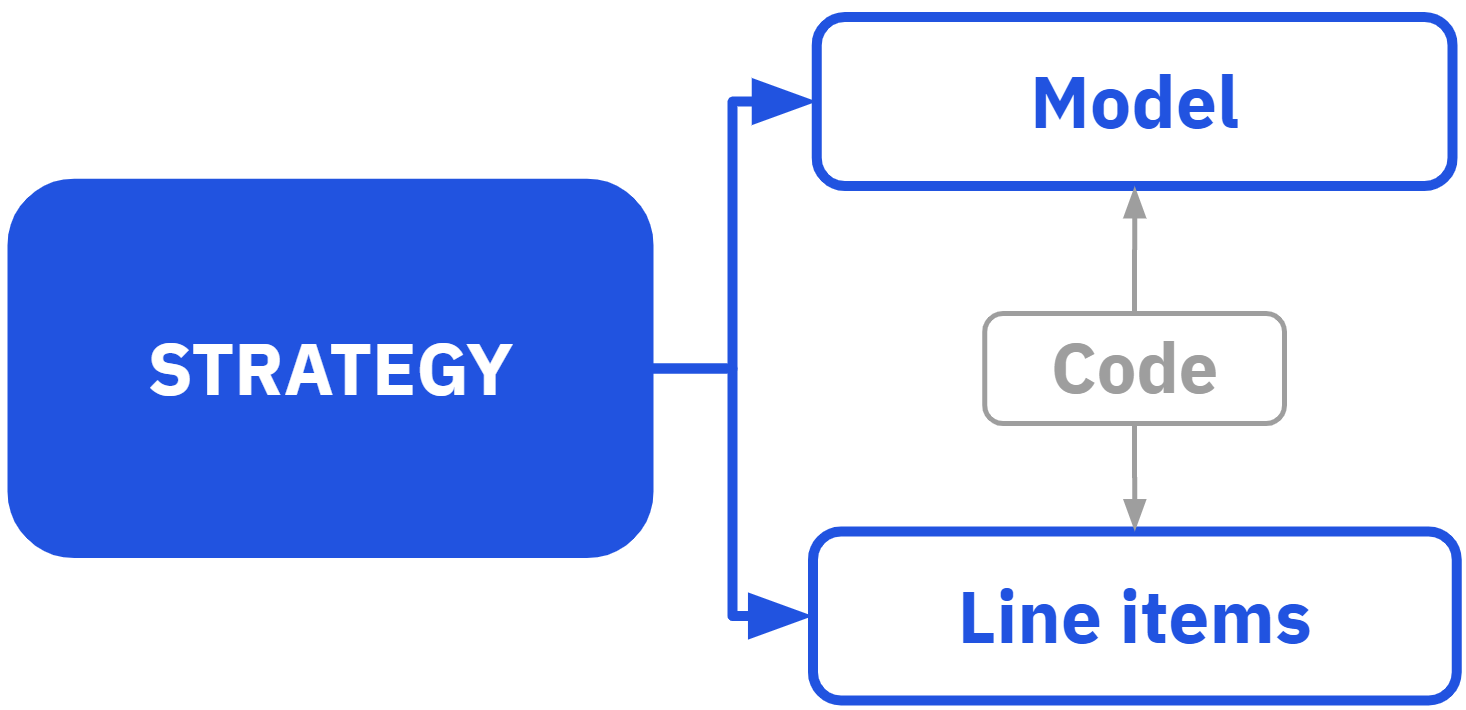
A proper quantity take-off strategy consists, in a simplified way, of DEFINING which elements of the model are going to be measured, and then RELATE these elements to the LINE ITEM in which we capture their measurement. The link between the two is a CODE that allows the traceability of the quantification. For those elements that are not going to be modeled, we document how their quantity can be taken off.
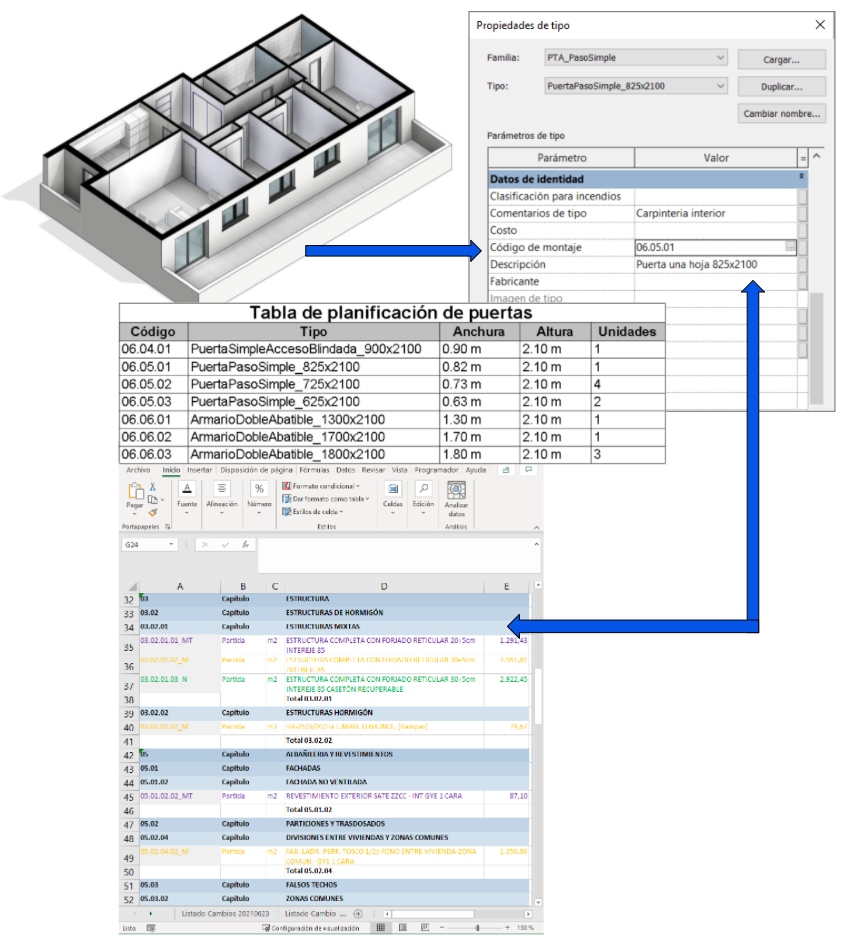
When documenting the strategy we need to indicate at least the following key points:
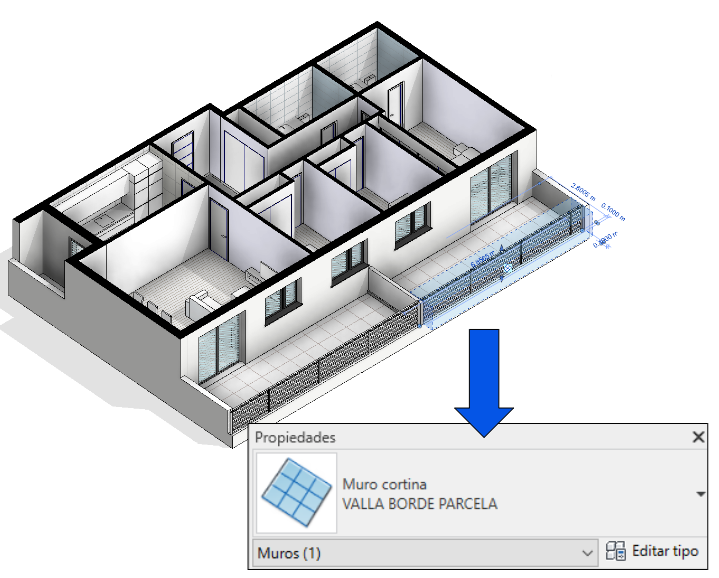
- Category of the element that corresponds to that line item in the BIM model. Sometimes the element does not match the Revit category.
Example: The perimeter fences of a plot of land or a building are often modeled with the curtain wall category.
- Parameter containing the code to perform the mapping.
- How are we going to code? It is most common to use the same code as the line item code in the parameter mentioned in the previous point, but it is not mandatory.
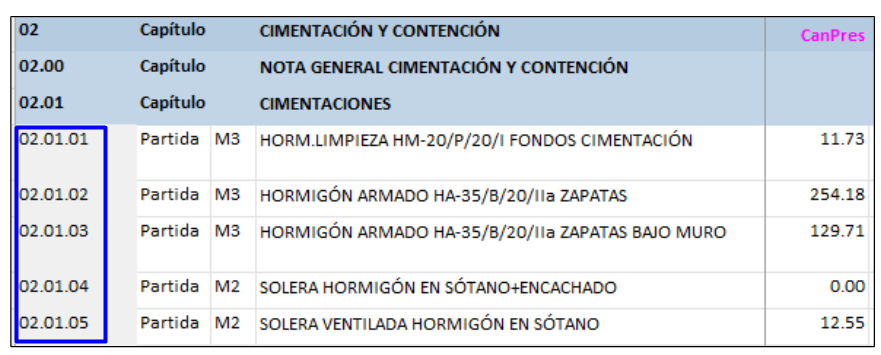
- If the line item is not modeled, where do we find the information to carry out the quantity take-off (support documentation, percentage of another element that is modeled, ratio, etc.)?
Example: we can avoid modeling the baseboards of the rooms and measure them according to the perimeter of the rooms by subtracting the door width, which are values that can be extracted from the model.
- How many line items can be obtained from each element in the model?
Example: from a wall we can obtain m2 of bricks, insulation and the rest of its layers.
Example: a sink can be associated with nested or non-modeled elements such as soap dishes, mirrors, towel rails, etc.
- If it is necessary to do some previous processing of the quantity take-off to obtain the units required by the project budget.
Example: a piece of furniture (quantified in units) contains a LED strip (measured in linear meters). The LED strip take-off is obtained by multiplying the number of furniture units by its length.
With these key points, the modeling and the quantity take-off criteria are closely linked. Logically, there is no single way to proceed and the strategy to follow will depend on different factors that we will see below.
Factors to be considered
- Data source
- Quality of the data to be extracted
- Cost database to be linked
- LOD/Project Stage
- Type of construction work
- Construction cost estimating software
- Parameters in the BIM models
Data source
The most common source of data will be the BIM model, in its native format or in IFC format. However, as mentioned above, it is possible that not everything that must be measured is modeled and additional information is needed to measure certain items. This may be due to a modeling strategy.
Example: we may decide not to model electrical boxes in a project, and measure them by estimating a value ratio or based on our experience.
At some other times it may be because the item is within the scope of a stakeholder who does not use BIM.
Example: a surveyor calculating earthworks by alternative methods.
Once the data source has been defined, we must check the quality of that data.
Quality of the data to be extracted
There are certain key questions we need to ask ourselves:
BIM model (native or IFC):
Which line items can we take-off from the model and which cannot?
Even if not all line items are taken off from the model, it can be considered a good quality model as long as it is properly documented and these extraction adjustments can be planned.
Example: the BIM model does not usually contain scaffolding, cranes or other elements for preliminary works. It must be documented by other means.
Example: in Revit duct fittings do not contain the length information. It is usual to count it as a percentage (15-20%) of the linear meters of ductwork in the model.
If you don’t have a previous strategy because you have received the model afterwards, you will have to do this exercise.
Can all line items be taken off in the units indicated in the cost database?
This is directly related to the way in which the model has been done or is planned to be done. Each element has geometric characteristics (weight, length, area, etc.) that can be obtained by checking its properties and that are based on its category. However, it is not always possible to obtain all types of parameters for all elements.
Example: in Revit, the category of furniture only allows checking the unit quantities of the elements, although we can find some benches that are cost planed per linear meter. We will have to create a Revit family that provides this unit of measurement using a line based family template.
Even if the elements are properly coded, we will not be able to perform a good quantity take-off if their unit of measurement does not match the unit of measurement of the cost database.
Is it all coded?
It is essential to have everything coded, so if not, we have to do it. How?
Manually: We can use visual tools, such as creating views with filters in which only non-coded elements are visible. We can also use schedules showing the coding parameter as well as the parameters necessary for the elements to be defined: element name, dimensions, etc.
With automations: We can use spreadsheets with the record of the line item codes and the name of the element in the model (or any other defining parameter), and map the codes. A Dynamo script would do. In Modelical we have a tool available for this in the MRT (Modelical Revit Tools) called Equalizer.
In case all the elements are already coded, it is recommended to check that the coding has been done according to the agreed system. For this, in Modelical we also use our own tool, in this case Baywatch, and we perform a parametric test that verifies that the parameters of the elements are following the defined naming convention.
Is there good model coordination and quality?
The main thing is to have a quality model. No matter how well the model is coded, the quantity take-off will be wrong if the modeling is not real.
The model may have duplicate elements, or their modeling may be inaccurate (walls that do not reach the slabs, poorly defined floor perimeters, etc.). There may also be clashes that are not solved in the model and, in order to fix them on site, it may be necessary to add meters of piping, ducting, etc. which, logically, since they were not expected, will mean a variation in the measurement.
Spreadsheets or other support documentation:
Record. Is it accessible and documented?
There is no more important requirement for the proper use of support documentation than to have a well-documented record of it.
The recording of this support documentation must make it very clear whether it is complementary or substitutive to modeled values. Otherwise, we may find modeling duplications, which are as important as missing ones.
Example: the door hardware (handle, locks, panic bars, etc.) are not going to be take off from the model but, based on the door type, we are going to have a spreadsheet with all the hardware for each of the types and thus be able to include the quantification of these items in the project budget. But it is very common that our door families have some of these hardware items modeled for aesthetics or spatial coordination. We will look at the spreadsheet and not the model for the quantities.
Is the information well coded and classified?
In the same way as in the BIM models, in the support documents we will have to establish to which line item each element corresponds, since it is absolutely necessary to be able to relate them. The coding convention will be common for all the elements of the project, regardless of the source of the data.
Cost database to be linked
The cost database is the conventional structure of budget line items with chapters, subchapters, line items, description, units of measurement and unit price.
The price of each line item may or may not be known; this will be less relevant for us since we focus on quantity take-off, but what we need to know is WHAT to measure, in what UNITS we have to do it and HOW this information is structured.
And we will know all this thanks to the cost database:
- WHAT: the description details everything included in the line item and provides any additional information required (whether it includes auxiliary works, rubble transport, fully installed, etc.).
- UNITS: also defined in each line item. The cost of an item is always applied in a specific unit. Knowing the unit from the beginning is imperative, because, as we have seen, it determines the modeling and parameterization of the elements.
Example: a façade can be measured in linear meters and without deducting openings, or it can be measured by area deducting openings. The decision will result in different quantity take-off and thus in different prices, but it will also be modeled otherwise. In the first case we could save the modeling of the windows, although the precision would be less (it may be worth it in early stages).
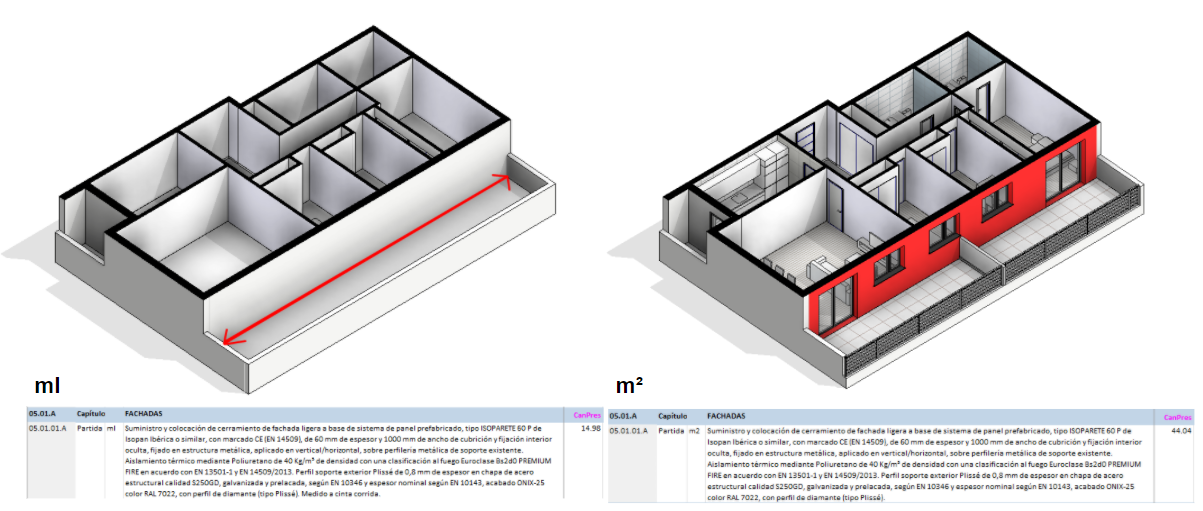
- HOW: through the code, line items are classified in a hierarchical order of chapters, subchapters and the line items themselves.
In other words, the key to success will be to study carefully the line items from the cost database before modeling and to model in a way that is compatible with the required units of measurement. But is it possible to work in parallel the project budget and the model?
LOD/Project Stage
In the development of a project it is logical that the structure of the project budget is not entirely defined from the outset, since it is a "living" process that evolves. In the same way that the project goes through different stages and levels of detail during its development, this process of progressive definition also occurs in the definition of the line items, as it is inevitable that new elements will appear and others will disappear or change as the project progresses.
Therefore, working in parallel is perfectly possible, and in fact highly recommended, since it allows to perform the quantity take-off from the models from the initial stages to the final stages, even reaching the construction stage. If this is done, it is essential that the structure of chapters, subchapters and line items is always maintained, as well as their proper coding, in order to avoid errors.
Construction projects have several stages, from strategic definition to the use of the building once it is built. These stages are related to a specific LOD (Level of Development) of the model, for the simple reason that a higher level of definition is required as the time to materialize the project approaches.
The stage and/or LOD of the project will determine the strategy for both modeling and quantity take-off. As the project progresses the LOD tends to increase, so it would be wise to have a strategy that takes on board these new data inputs and advanced definition.
In early stages, it will be possible to take-off approximate quantities of many items indirectly, even if the model is at a low level of detail.
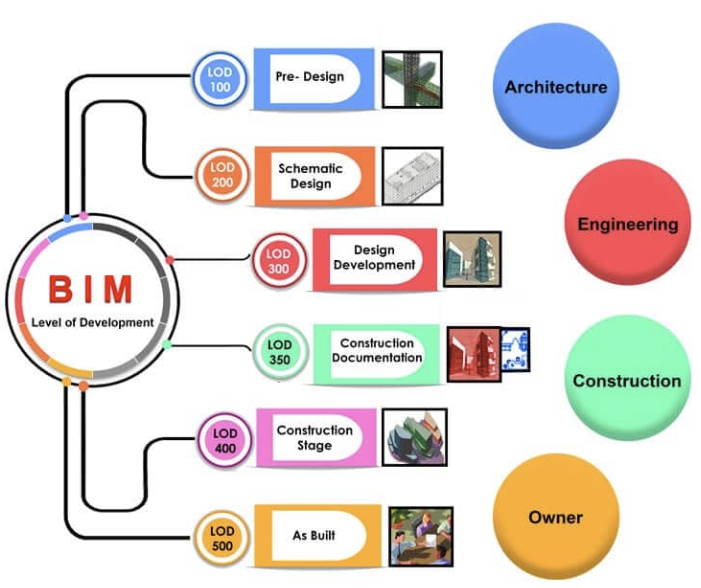
Example: in a Schematic Design stage, where the levels of definition are low, certain elements such as cornices, wall finishes, underfloor heating or fire protection elements, among others, are probably not modeled. However, we must not ignore that this has an impact on the project budget. In these situations, we must adopt a specific quantity take-off strategy for each casuistry:
- Measure the cornices using the perimeter of the roof.
- Assume wall finishes measured per room.
- Estimate m2 of underfloor heating per floor area.
- Obtain ratios of fire extinguishers and smoke detectors per area.
Type of construction work
This is a very interesting factor, since usually the documentation and the processes that are found on quantity take-off are based on new construction projects. However, there are other types of work where establishing a coding system that is the same as the one used in new construction projects does not make sense.
We would like to point out four different types of construction works: New construction, demolition, temporary elements and renovation.
- In NEW BUILDING/DEMOLITION, as mentioned above and keeping it simple, an element has a code according to a line item in the project budget, whether it is a new building item or an element to be demolished.
- In TEMPORARY ELEMENTS we have a particularity and it is that the same element needs at least two codes. One to denote that it is being built, and another to denote that it is being demolished. However, not necessarily all the elements of the same type are going to be demolished, but only some of them. This means that the parameter to be filled with the demolition code could not be a type parameter, but rather it is a particular situation of each instance. We may also find the situation that the cost database contains temporary element line items, so the relation of one element equals to a line item could be kept.
Example: some renovation works are going to be done in the west wing of an office, right where the toilets are located. Temporarily for the duration of the works, a corridor will be built to access the toilets and to separate them from the renovation. So we will have at least a new wall, and then a demolition of that wall. But the same type of wall will have been used at other spots in the renovation for the creation of new partitions and these new walls will not be demolished. Therefore, the same wall type has a new construction code based on type and a demolition code that cannot be based on type, but rather on instance, since not all walls of this type will be demolished later. If the project budget had an item called "temporary partition wall" that included execution and subsequent demolition, one code would be enough.
- In RENOVATION works, the scenario is more complex, since the actions that we can do to the elements are very diverse. So, when we are going to define our coding strategy, we will have to consider instance parameters to deal with the actions to which each one will be exposed.
Example: to paint a door that has already been painted previously, we will need to do a stripping and then apply the new paint. For another door we want to do the same, but since it has woodworm before repainting it will be necessary to cover those holes. We will need to consider these actions in instance parameters, and in addition, we will need several parameters to specify all the actions, or else devise a system to put all the codes of the line items that affect it within the same parameter.
Construction cost estimating software
There are several construction cost estimating programmes in the market and it is even possible to create a project budget with a simple spreadsheet. We differentiate between software that is directly related (linked) to the model, and software that is indirectly related (not linked) to the model.
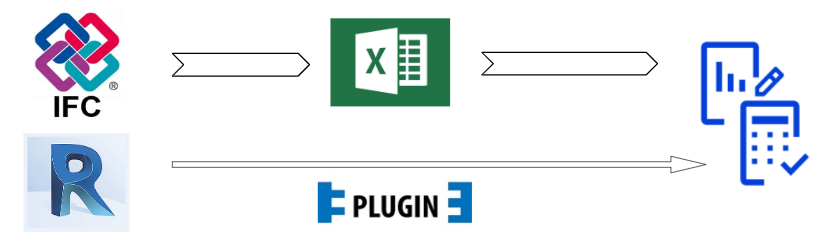
- DIRECT RELATIONSHIP software has a plugin that connects the model data to the construction cost estimating software. Some of the most common programmes are Presto, Menfis, Archimedes or TCQ.
The big advantage is the automatic updating of the data in the construction cost estimating software as changes are made in the model. On the other hand the drawback of this workflow is the limitation of our strategy to the plugin. For instance, programmes that can only read the default parameters of the modeling software and not parameters created by the user.
- INDIRECT RELATIONSHIP software is the one that, as the name suggests, does not have direct relationship between the model and the software, requiring for example spreadsheets as an intermediate step. It is true that this way the workflow is longer, but it gives us much more flexibility to define the strategy.
Parameters in the BIM models
The parameters in which to fill the budget line item code can be either type parameters or instance parameters. We will use one or the other depending on our needs.
Type parameters
By its nature, changing the code in the type properties of any instance will change the parameter for all of them. Within these parameters, we distinguish between those native to Revit and those created by the user.
Native Parameters
In Revit, we often use the Keynote and Assembly Code parameters, which are intended to incorporate codes according to pre-defined classification systems. We can take advantage of them as they read data from text files from external sources and link them to our project budget structure.
In addition to types, the Keynote parameter can be assigned to materials, which has an additional application when measuring by materials. For this reason, a good strategy would be to use the Assembly Code to make a standardized classification (Uniclass, OmniClass, GuBIMClass, etc.) and the Keynote to accommodate the coding of line items.
The problem is that we often use both parameters for these standardized classifications or for some other classifications beyond the quantity take-off. If this is the case in our project, we will not be able to use these parameters for our purpose.
Project parameters or Shared parameters user-created
It is common to use project-specific parameters that incorporate an uppercase prefix with the project description or the client. This makes it easier to identify them when working with data in the model.
Parameter name example: MOD_LineItemCode
Instance parameters
They are less common for quantity take-off, but sometimes they are also needed. They are used when, within the same element type, we have to deal with different line items.
Example: pipes are the same element type regardless of their diameter. If we want each diameter to be associated with a different line item, we must use instance parameters.
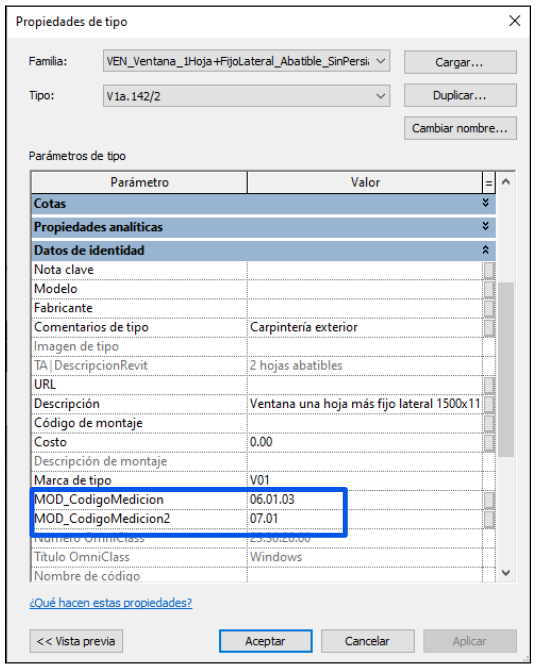
We may also have the need to create second quantity take-off parameters. This is required when a single element is associated with two different line items, as we have seen previously in renovation works. But it can also make sense for other situations.
Example: in the event of two identical windows whose only difference is the type of glass used, we can associate the specific code of the joinery to the main quantity take-off parameter, and create a second parameter to indicate the glass code. This way we will avoid breaking an element into several and we will assign a single element to several line items.
Conclusions
The “magic button” to do quantity take-off can exist if we have a tool that extracts parameters from the models and groups them appropriately according to the line items that we need to use. Anyway, before pressing the button, we need to define a detailed strategy taking into account all the factors mentioned and carry it out.
Tips & Tricks
- It is always better to avoid exceptions, even if this means not having the best solution. Simple and practical is better than complex and perfect.
- Define a strategy according to the phase of the project you are in, but try not to make it so rigid that it cannot evolve.
- There are many tools on the markCollaborative Memories Guidelines for more or less automated quantity take-off, but do not forget what the goal is: to match the elements of the model with the budget line items. Having a spreadsheet you can also do it.
Related links
- You can watch the webinar we did on BIM quantity take-off here.
- In the following Collaborative Technical Reports Guideline, we explain a process that can be followed to document the connection between the model, the project budget and technical reports.
- Check out this post on why a developer wants to use BIM to understand the value of quantity take-off. You can also watch it in this video.