

Grasshopper Scripting 101
Introduction
This is the first of a series of posts that should work as an introductory course to computer programming in general and scripting in Grasshopper in particular. It was first written for my classes in IE University but I’ll make it – at least partially- accesible here due to two facts: Programming is something we do professionally at Modelical and many of my colleagues help me with it and posting this on the blog offers me better tools to share the code and to receive feedback.
Why Do I Need To Learn To Program?
Simple: Buildings are designed, built and maintained based on information. That information has to be created and curated. Creating, storing and processing information is much simpler nowadays because we have computers. Dealing with computers is several times simpler and more powerful if you speak their language, and that language is programming.
If you’re reading this, chances are you’ve had a great time playing and learning Grasshopper and now you need/want more. Well, let me tell you that programming is ALL you’ve been doing this far. Connecting nodes is -basically- coding in a language called Grasshopper in order to control an application called Rhino. Now we are going to learn how to do that more consciously and efficiently.
Things I Can Do In Grasshopper If I Learn Scripting.
Well, is not just a matter of quantity but also a matter of quality and effectiveness. With the beautiful tools and component added to GH with every release, there are few things you can do only if you write scripts but there certainly are some important ones. By learning scripting you’ll be able to:
Besides, this might be your first try with scripting in general and let me say that if you’re able to understand the principles of programming through GH, you’ll be able to understand and leverage other tools more deeply, even learning other scripting languages for other applications and who knows, maybe develop that superpower called Programming.
Programming vs. Scripting
You might have noticed that I talk about programming and scripting. They are not the same, or at least we’ll assume there’s a difference.
Scripting comes from latin Scribere – to write – and is used to describe a series of ordered instructions to be completed by the computer. A script is a list of replicable actions to be completed by a certain computing environment. A script works most of the time in the context of a wider application, Grasshopper within Rhinoceros in our case.
Programming is the action of creating a program, a set of instructions required by a computer to perform a certain task. Programming is a much wider concept as you would call Rhinoceros a program and not a script. Programs are interactive and have different status, they perform many different tasks and some of them may resemble or be like scripts. Programming, in a general sense, requires careful planning and uses complex strategies like the widely accepted paradign of Object Oriented Programming.
You’ll get a better idea with the course but keep in mind that programming requires writing scripts among other things and that scripting is a great point to start learning to program.
Programming / Scripting Languages
Scripting is basically about writing instructions for a certain application. Those instructions must come with a language, a syntax and a vocabulary.
Language and syntax come together and in computing you have to follow the latter very carefully as computers cannot understand what we’d call “natural language” as we humans do.
See the difference:
“Er…can you come closer, yes, that’s it, a little bit mor…to your left, now you gotta raise your hands, that’s nice, ok, so we’re ready…”
“Come to X=1.5, Y=0.73. Raise your hands.”
The vocabulary is optional but we’ll be faster and more precise if we’re able to use better targeted nouns, adjectives and verbs when discribing to the computer what we want it to do.
There are hundreds of programming languages and some of them are also available to speak to Rhinoceros / Grasshopper: C# (C-sharp) , Visual Basic .Net and Python. For what is worth, all three languages would do fine for us. None of them has a winning feature and all of them are quite popular for many other purposes. Each one has an specific syntax that you should get familiar with in order to perform well. We will use C#.
For the vocabulary, we will use a library called RhinoCommon. It is a set of instruction specifically writen for Rhino in a modern and convenient way. RhinoCommon will be a set of shortcut words to ask Rhinoceros / Grasshopper to do amazing things for us.
Why C# and not Python nor VB.NET?
There is only one and main reason for this: because I know C# better than the others. Period.
Trust me, programming is a much bigger endeavour than just learning a language and if I am going to teach you, we’ll both be better off if one of us knows what he’s doing.
Besides, there are other and more technical reasons to choose C#:
But again, the main and only reason to choose C# over the rest is that I feel more confortable with it.
The simplest description of Programming
After some years of thinking about it I’ve come to the following ridiculously over-simplified expression of programming.
You should understand programming -and scripting as a subset of it- as the art of storing and processing pieces of information, one bit at a time. An example:
When you ask your computer to add 5 + 5,
int result = 5 + 5;
I like to think it in this way.
- The computer has to clearly undertstand what you mean by “5” and “+”. You help it by stating somewhere that you are working with integer numbers.
- At the same time you’re creating what is called a variable, a space in memory to store the result. It is important that you declare the type of the result as it will help the computer allocating only the right amount of memory.
- The expression is evaluated one part at a time and the result variable is filled with 10.
Running Scripts In Grasshopper
Scripting in GH is intended to help you write your own components, and as so, you will be only be able to write scripts within components.
To create a new C# custom component, double click on the canvas and type C# Script or go to Maths tab > Script > C# Script.
Scripts are quite similar to expression components, you can add and remove inputs (and outputs) by zooming in and pressing the (+) and (-) buttons.
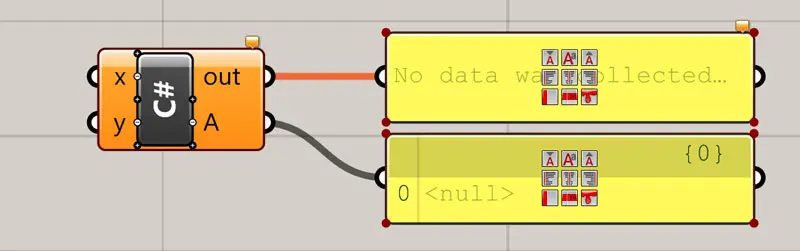
To edit the script, just double click in the center or right click on it and select “Edit Source…”
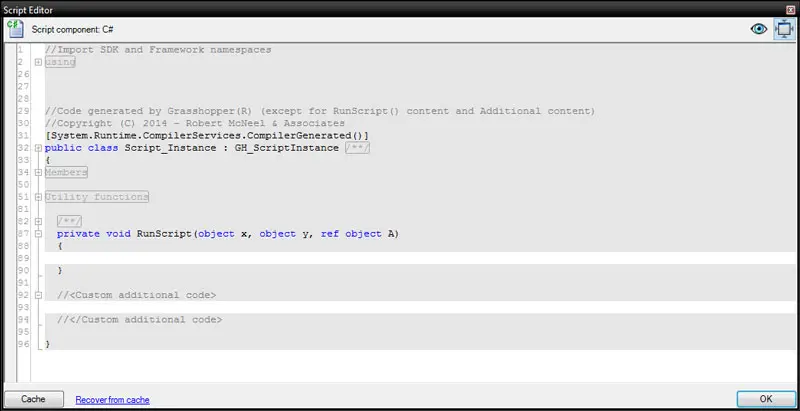
The editor contains to editable regions:
Your scripts will be saved as part of the GH definition so you don’t have to worry about the editor, so simple, so good!
Ok, so now is time to start working with information. Go ahead to the Next step: GH Scripting 102 – Variables & Assignment