

Grasshopper Scripting 104
Lists
In the last post we discussed applying conditional operations to single values. But that is way too simple. We expect to process many different values when working with Grasshopper and the power of scripting increases when we deal with collections of data. The main collection type you should care about is The List.
Download here the GH file (0.9.014) containing the examples.
Working With Lists
Lists can be created or processed within the scope of a Grasshopper C# scripting component. To access an input parameter as a list we must specify so in the context menu. This will allow us to iterate through all the elements of the list instead of performing the defined operations for each input by default, as happened in the examples in 103.
Now we can access the list as a whole to, for instance, measure how many elements are there in the list with the Count property.
 private void RunScript(List<double> x, ref object A)
  {
     A = String.Format("There are {0} elements in the list", x.Count);
  }
Declaring Lists
In order to process a list we are going to need a bit more of flow control than just conditionals but before diving into loops let’s see how to declare and populate a list inside a C# component.
Lists are a special construct that needs to be declared with a sentence you should get familiar to.
List<double> myList = new List<double>();
We must precede our variable name with the words “List<dataType>” and then assign a “new” empty list by calling the function “List<double>()”. Whenever you see a statement with empty parenthesis like .ToString() you are dealing with a function (called methods in C# jargon).
Let’s see lists in action:
private void RunScript(ref object A, ref object B, ref object C)
  {
    //declare a new list
    List<int> myList = new List<int>();

    //fill the list with Fibonacci series
    myList.Add(1);
    myList.Add(1);
    myList.Add(2);
    myList.Add(3);
    myList.Add(5);
    myList.Add(8);
    myList.Add(13);

    //output myList through A
    A = myList;

    //create a new list copying the contents of myList
    List<int> myReversedList = new List<int>(myList);

    //use the Reverse Method to find the reversed version of the list
    myReversedList.Reverse();

    //output the second list through B
    B = myReversedList;

    //retrieve the third element in the list
    C = myList[2];

  }
We interact with List mainly through methods and properties:
- List.Add(E) will add E to the list.
- List.Reverse() will invert the order of elements in the list.
- List[i] will retrieve the element of the list with index i
- List.Count will access the property containing the length of the list;
A Note On Reference-Type Variables
In the second lesson we talked about reference-type values saying they were more flexible. You have to be careful when dealing with them as they behave quite different from value-type variables. Let’s seen an example.
private void RunScript(ref object A, ref object B)
  {
    //declare a first variable
    int myFirstInteger = 3;
    //declare and assign a second variable
    int mySecondInteger = myFirstInteger;
    //modify the second variable
    mySecondInteger += 5;
    //output values
    A = myFirstInteger;
    B = mySecondInteger;

  }
The result here is something we would expect, the second variable gets the same as the first, then we alter the former but the later stays the same.
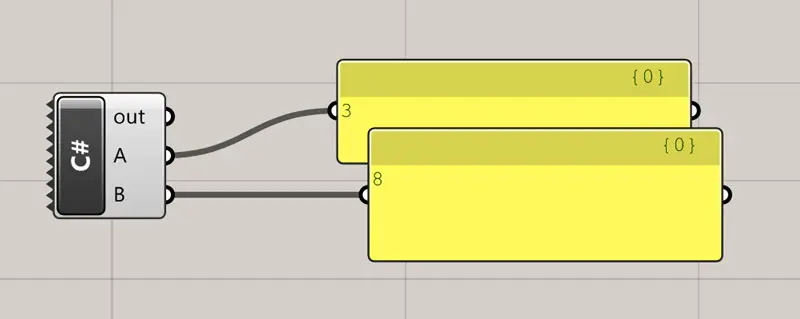
Now let’s do something similar with a list of strings:
 private void RunScript(ref object A, ref object B, ref object C)
  {
    //declare a new list
    List<string> myList = new List<string>();
    //fill the list with animal names
    myList.Add("Dog");
    myList.Add("Cat");
    myList.Add("Rabbit");
    myList.Add("Lion");
    myList.Add("Tiger");
    myList.Add("Elephant");

    //output myList through A
    A = myList;
    //create a new void list
    List<string> mySecondList = new List<string>();
    //assign myList to mySecondList
    mySecondList = myList;
    //reverse the second list
    mySecondList.Reverse();
    //output the second list through B
    B = mySecondList;

  }
Look at the result:
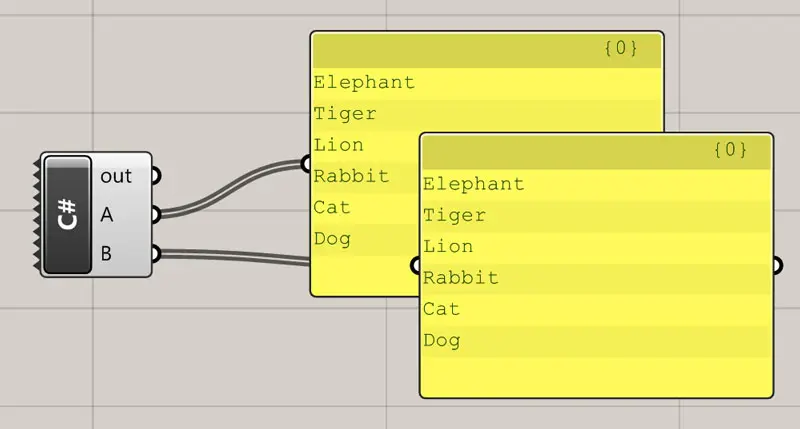
Weird right? Despite we only reversed the second list, both outputs have been reversed. That is because Lists, and Points, Surfaces, Meshes and everything else are Reference-Type variables, meaning that when we called mySecondList = myList; we where not copying the contents of one list into the other but actually linking both variables to the same data, so if we modify one we’ll do so for all of its references.
That’s why, on the previous example, we created the copy of the list not using a “=” statement but a speciall method of Lists:
List<int> myReversedList = new List<int>(myList); //this will crate myReversedList as a brand new copy of myList
Understanding this is important not to get fooled when working with loops and complex assignments.
Challenge
1. Write a component that checks if a list has an odd number of items and if so, returns the element at the middle.
2. Write your own version of the List Item component.