Grasshopper Scripting 102
Variables and Assignment
After the introduction in our latest post now is time to get our feet wet with a fundamental concept: variables.
What Is A Variable?
Variables are portions of memory that represent a certain entity and that have a name. We use variables to hold information in order to read, write, modify or process it. Variables would be equivalent to parameters in GH and they behave in a very similar way.
Variables in C# can belong to two families: value-type and reference-type. Value-type variables are used to represent basic information such as integer numbers, decimal numbers, strings of characters and boolean states. Reference-type variables are way more flexible and can be used to hold any type of data. In GH we will use value-type variables to basically store numbers and booleas and reference-type for surfaces, curves and points.
Declare and Assign Variables:
When we need a variable, we have to declare it so the computer can allocate some space for it in memory. We do so with the following statement:
DataType VariableName;
Once your variable is declared you have to fill it with a value. This value can come from another variable or can be created on the fly by calling a function or a number / string / boolean.
Here are some examples of variable declaration and assignment:
//declare an integer variable and name it myInteger
int myInteger;
//assign 85 to the variable
myInteger = 85;

//You can also do the same in just one line.
int myOtherInteger = 74;

//Declare a boolean
bool myBoolean = true;
bool myOtherBoolean = false;
bool myThirdBoolea = myBolean;

//Declare some doubles
double myDouble = 12.33;
double myOtherDouble = 1.0;

//Strings come within quotes
string myString = "Hello World!";
You should keep this in mind when naming variables:
Variable Types
C# is a strongly-typed language, which means you’ll have to supply a type to every variable.
Outputting Values In Your Component
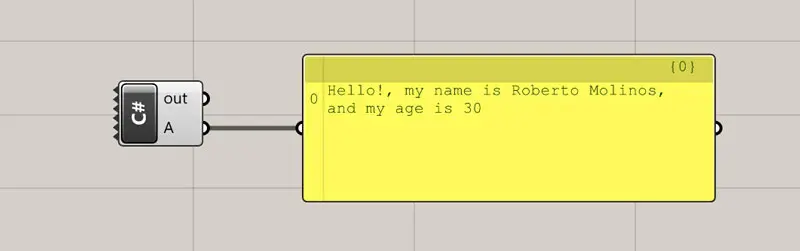
Let’s see a complete example of variable declaration, assignment and output.
- Create a new Custom C# Component by double-clicking on the canvas and look for C#…
- Remove every input parameter by clicking the (-) sign after zooming in the component.
- Double-click on the center of the component.
- This should be your code:
  private void RunScript(ref object A)
  {
    int myAge = 30;
    string myName = "Roberto";
    string mySurname = "Molinos";
    string mySentence = "Hello!, my name is " + myName + " " + mySurname + ", and my age is " + myAge.ToString();
    A = mySentence ;
  }
Keep in mind that you should only edit the region inside the curly brackets, as the rest is controlled by GH itself.
In the example above whe are doing the following:
- Line 1,2 and 8 are controlled by GH so we cannot change anything from them.
- Line 3 declares an integer to store my age and assigns 30.
- Line 4 and 5 declare two strings to store my name and surname and those are assigned.
- Line 6 declares a string and directly assigns the concatenation of several other strings. Those not being a variable are created by typing within quotes and the parts are joined by using the (+) operator. myAge is converted to a string using the .ToString() function.
- Finally, in line 7, the output value A gets a reference to mySentence.