

Collaborative technical reports
How to effectively manage all the information defining a project
Collaborative technical reports
Objectives
To ensure the consistency of a project’s main deliverables: Models / sheets, technical report, Cost Plan.
Requirements
Know the collaborative work tools from the Google suite or similar.
Introduction
Since we included the word BIM in our vocabulary, we have learned to use modeling software and to work with it .
We have file exchange formats because there are many programs we can work with.
The "common data environment" (CDE) appears, where all agents publish their models and sheets, and there are no longer copies or different versions of files. We have updated information, and we all use it.
Collaborative platforms have even been developed where several users can work with the same model simultaneously.
We are proud of applying all the BIM dimensions including : sheets extraction, geometric coordination, planning, measurements, sustainability, maintenance ...
But what about the Project technical report?
Which control tools are available to ensure that the information contained in the models is described in a technical report?
In addition, the description of the cost plan items is the one that commands on site, so we will have to ensure that items, technical report, model and sheets go hand in hand.
Talking about BIM is understanding that all the parts that make up a project are aligned.
At Modelical we often find ourselves in the situation of coordinating all the project collaborators and all the project deliverable documents. Working in BIM is not only about modelling but also about efficiently managing all the information that defines a project.
The role of the BIM Managerconsists of gaining strength thanks to the use of collaborative tools and platforms.
We want to share a very simple but effective workflow that we implemented in a project with more than 10 collaborators, centralized by the architectural team, with more than 80 people working on it.
Procedure
Everything will turn around a collaborative data table in the cloud, in our case Google Sheets.
This table will be the dictionary of our project, from where the model, technical report and cost plan will be coordinated. In order to ensure the table updating, control tools will be needed.
1. Working under the collaborative platforms
The following outline is developed and explained in steps:
- Define the structure of the collaborative technical report
- Assign codes to the chapters
- Establish coding of elements
- Assign codes to elements
- Creation of the master coordination table
- Documentation in the cloud
- Risks, advice, precautions
Defining the structure of the collaborative technical report
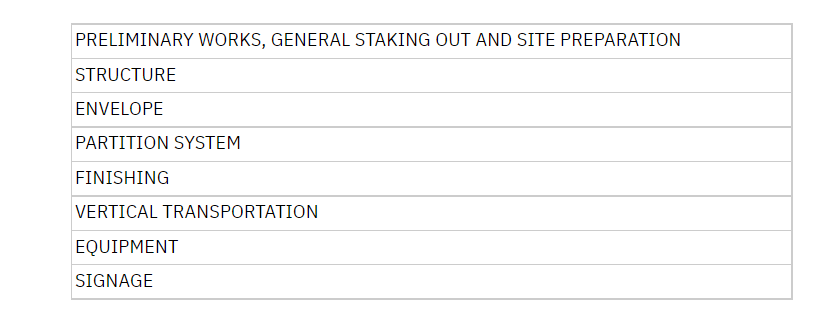
A project is explained through its technical report, therefore the structure must be defined. An example of chapters of an architectural technical report would be the following:
Assigning codes to the chapters
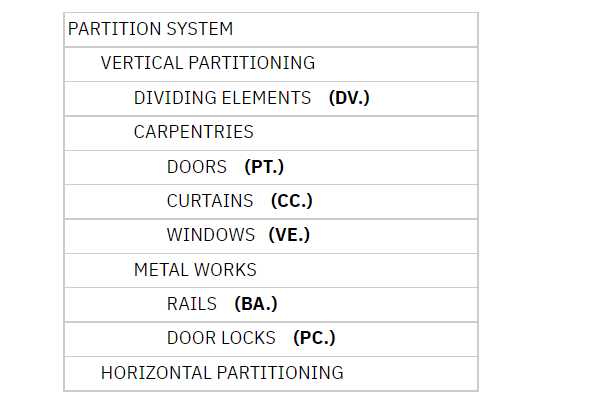
Throughout the development of the project, the construction systems defining it are included and classified in the structure of the technical report. It is then, when it is necessary to establish prefixes that serve as codification for the elements under the same heading, so that they are identified and classified. For example:
Establishing coding elements
Once we have defined the prefixes that will be used to code all the elements of the project, we will have to analyze their classification needs on a case-by-case basis.
For example, dividing elements (DV.) could be numbered from 000 to 999 according to the creation order. They could also be sub-classified according to the material by adding some letters or assigning a series of numbers. For example:
DV.Y01 (Gypsum dividers), DV.C01 (Ceramic dividers) etc.
In any case, the subclassification will correspond to the one in the technical report, so that the codes continue to be related to the technical report structure.
This code will be the one appearing in the legends from the sheets, in the modeled element and also in the technical report and the cost plan, so that we can identify it easily.
Assigning codes to the elements
The next step would be to assign codes to the actual elements of the project. For this step, it will be also necessary to coordinate the model with the cost plan.
What does this mean? We have to be very clear about how the different elements are going to be measured in order to use the most appropriate family in the model or modelling according to certain guidelines, which will make possible the data extraction in the required units for the measurements.
This requires good communication with the person responsible for measurements and working hand by hand r from the early stages.
By agreeing on a modeling strategy that includes measurement extraction, you can significantly simplify your work. Moreover, you can follow a strategy in describing the terms for the cost plan lines that will make the modeling easier.
We will find 3 basic cases:
- A modelled element has a unique code that corresponds to a cost plan item in which only one element is included. Ex1: A chair is modeled, and a chair is described in the cost plan line.
- A modelled element has a code associated with it that corresponds to a cost plan item in which several elements are included. Ex2: A window is modeled and the cost plan line also includes the shutter box. Ex3: A wall is modeled and the item includes the brick and the cement mortar. We are then talking about a construction system. This will be the most common casualty.
- A modelled element or construction system has several codes associated with it, which correspond to several budget items. Ex4: A wall is modeled, where the parameter Type Mark refers to the code that explains the composition of the wall, for example plaster, while in an example parameter, let's call it TM_Skirting , the code of the type of skirting is marked according to design. Ex5: A shower tray is modeled, where the parameter Type Mark refers to the shower tray, and another parameter, for example, TM_Accessories, refers to the shower tap. Each code corresponds to an item in the cost plan, but they are obtained from a common element, each one attending to a specific parameter.
Master coordination table creation
Once the coding and classification systems are clear, we move on to documenting the information, and it is for this purpose that we use the master table mentioned previously.
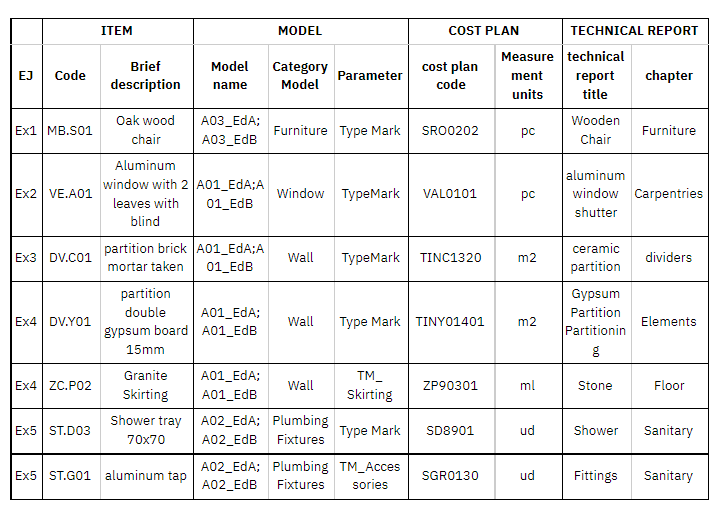
It displays by rows, all the construction systems of the project, which should appear in the technical report, cost plan and model. A construction system corresponds to a cost plan item, to an explanation in the technical report, to an element in the model and to a code that identifies it in all documents, placed in a parameter to be defined within the modeled element.
To keep a better control, we will classify the different technical report epigraphs by sheets, according to their code and according to the prefix. EX: Dividers on one tab (DV.), Doors on another (PT.), Curtains on another (CC.), Etc.
In the columns, we will place the parameters that we consider necessary for understanding and coordinating, which can be classified into 4 large blocks: Element, Model, cost plan and technical report. The success of the consistency of the project will depend on keeping this table updated and coordinated, project can be ensured.
Element block:
- Code: It will be the code of the element's project, mentioned above. It will correspond to the label that appears on the sheets and the legends.
- Brief description: Necessary to give literality to the codes.
Model block: Model
- Name: Here we can write the name of the models in which this element appears. It will be very useful if we have a large number of models, but perhaps unnecessary if the project has very few models. Whenever there is more than one information in the same cell, they must go with a separator, such as ";" in order to subsequently manipulate the information.
- Model category: Refers to which family category to search to find this element, in order to make a quantity schedule with the correct category. As we saw earlier, an element may be encoded in one parameter within another, which does not have to correspond to the category that would be used if this element were modeled independently.
It may also be the case of using a modeling category different from the element itself, for ease of modeling or other advantages. Eg: modeling a louver ceiling as a roof, to have the geometry of each louver.
- Model parameter: The project code must be put into a certain parameter within the modeled element. It is possible that the same element has several associated codes. Properly placing this information in the master table, there will be no measurement gap, since all items must have a code associated with them that we must find in some parameter within the model families.
Cost Plan block:
- Code: Normally the cost sheets follow a coding according to the database from which they are reading the items. In order to have both codes connected, this will appear in the table, and it is quite usual that this code needs to be dumped back into the model, so the table is also the means of exchange of information of the different codifications or classifications that need to appear.
- Units of measurement: It is important to be clear about this for the description and modeling, therefore it is a requirement demanded of families that they can be accounted for according to the unit of measurement.
Technical Report block:
- Title in technical report: In order to identify in the technical report which constructive system of the table is being discussed. It is also advisable to put the code of the element in the same title.
- Technical report chapter: The chapter where the item must be searched will be indicated here, under the aforementioned title.
These headings are considered basic for the correct definition and organisation of the element, but as many can be added as necessary, both for definition and control. For example, adding a comments column is very useful to provide additional information.
Documentation in the cloud
Just as models can be made accessible using collaborative platforms, a similar system is needed for memory.
Our proposal is a text document in the cloud. It is practical to have as many text documents as tabs in the master table, so there will be a rigorous order of the project. For the final submission, it will be enough to download and join all the memory fragments to get a numbered document.
For the cost planning team, it will be very interesting to be able to access the technical reports in order to have the description of the cost plan line completely aligned with what the designer has described.
The more people working on the project, the more sense this workflow makes.
Risks, advice, precautions
Both the table and the memories, being collaborative, run the risk of being modified by users unintentionally, so we must establish editing permissions.
Our recommendation is:
- Establish permissions by tabs for the table, since in large projects, the work areas of each user are more clearly defined. If it is a project in which all the designers work in a transversal way, it does not make sense to manage permissions.
- Establish editing, commenting or suggesting per document, permissions for the reports, depending on the role of each member of the project. For the project team, being able to work on, correct and comment on a single document at the same time will be a convenience that speeds up the work.
An advantage from Google Docs and Google Sheets is that they allow you to see a history of editing by cell/word, indicating the user, and also to retrieve previous versions at any time. So it is safer to work under this type of database in the cloud than on a local server.
2. Control tools
With these steps, the system that articulates and coordinates the project deliverables is now in place, but in the end the data in this table is filled in by hand, so we cannot be confident that it is really coordinated with the information contained in the reports, models and budget.
What should not be done
In order to be able to process and analyse data, some techniques are incompatible, such as grouping cells, manual shading, colours, fonts... Since all these possibilities only deal with formatting, but do not allow the management of information by means of filters, otherwise a visual control would have to be carried out manually, and that goes against what we are looking for.
For example, if an element is obsolete, the correct thing to do is to generate a new column and fill it in indicating that it is obsolete, so that we can always filter the elements that are in force.
Making a strikethrough, hatch,etc. of the text will not be good practice and will make the table unusable by other data processing programs.
What must be done
To keep control of the data, we need control tools.
There are multiple resources, but we will give a series of tips to be able to do this analysis without having to develop a very complex system.
- To check the technical report
In the technical report, what we would need to know is whether the items explained match the items listed in the master table.
If Google Doc is used to create the technical report, a good practice that will allow you to later analyze and list the elements that are described in it, is to use the "heading" text styles, since you can automatically generate lists of all the headers, and therefore it will be possible to compare the list of the master table with the list of elements described in technical report.
- To check the cost plan
All measurement and cost planning programs have the option of exporting to spreadsheet format, so comparing one spreadsheet with another would not have much difficulty.
- To check the models
In the same way as in the measurement programs, in the modeling software we can obtain planning tables with the information we need. It is a matter of making the appropriate tables, which is simply knowing the categories and parameters to be listed within each of the models, information that is extracted directly from the master table.
3. Warnings
This workflow, as we said in the introduction, has been tested in a real project, led from the architecture team. We also want to share the main problems we encountered, since they must be taken into account from the beginning.
- First of all, even though it may seem obvious, licences for the proposed collaborative platforms are to be taken into consideration. We cannot forget that each company works with certain software and platforms, so requiring multiple licences to participate in a project can be counterproductive economically speaking and also in terms of training, since not everyone knows how to use all the platforms available on the market. It is very important to agree on which platforms will be used in advance, as we may find that some collaborators do not have access to them.
In our case, each company had a generic google account to participate in the collaborative documents, so it was not possible to know which specific person was modifying the files, but managing editing permissions was simplified and the number of registered users was reduced. In terms of training, as simple text and spreadsheet tools were used, minimal support was needed, but all participants were already familiar with them.
- Secondly, communication could also be a cause for problems. It represents a common warning in all projects. It is necessary to be clear about the means and the official way to implement changes. Because the idea of this workflow is to have coordinated models, technical reports and cost sheets, any variation in the description of a construction system must be duly notified, regardless of our control tools.
In our case, we used a comment column for the table, and the problem was keeping them updated.
We also made use of different text colors depending on the timing of the edits.
Despite the collaborative tools, they were not enough. Regular mails and meetings were still necessary, but always taking care of moderation, registration and the correct documentation of the topics discussed.
Any of these options should be a temporary communication system, and should be reset in the official deliveries, to avoid having dirty documents, with obsolete comments as they have already been implemented, or multiple colours in the reports.
- And thirdly, it is very important that all project participants are aware of this working system, and have the information available. The work done, regardless of the role of the person doing it, must be aligned with the common documentation.
Examples:
- If a modeller does not have access to the master table, he will not know, for example, that the shutter is measured from the window family, so he will not be able to create this family correctly and will not be able to code it according to its type. .
- If a facility coordinator detects that there needs to be a manhole cover in a room, and adds the description of this cover in the memory, but does not take it to the model or code it, it will not appear in the budget either.
- If a designer specifies construction elements and changes the description in such a way that this affects the families in the model, but does not warn of this, due to ignorance, the system will again not be working as expected and will be uncoordinated.
In other words, everyone should be aware that any system that appears new, disappears or is modified should be addressed in all associated documents and be concerned that this is the case, so that information should be available to everyone regardless of their editing permission.
Summary
It is possible and easy to coordinate the information in the report, plans and budget using collaborative work tools.
Having a master table will allow both the Project Manager and the entire production team to have a very visual idea of the development of the project and control of the project information.
It is important to use these tools in an efficient way, making a good data collection and using automations.
Excelente articulo que explica la importancia de la memoria del proyecto y la forma de implementarla en la metodología Bim.
Excelente artículo, Gracias Cristina.