

Computation Height on levels
Helpdesk
Computation Height on levels
Introduction
Sometimes a building has floors with two or more different floor heights. As it happened to one of our users, this can be a problem when creating rooms in the Revit model. However, as we will see below, it has a simple solution.
Question:
Why when creating rooms in a level do some of them appear as "Not Enclosed" although they are perfectly delimited? This is happening in those rooms that are 50cm higher than the rest of the rooms on that same floor.
Answer:
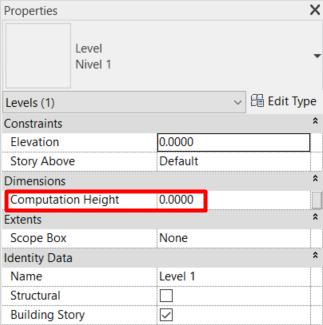
This question we were asked is directly related to the "Computation Height" parameter of Levels. By default this parameter is set to 0.00, so any room of that level that starts above that value will not be counted.
To change the "Computation Height" of a level, just select it (from an elevation or section view) and change the value of the parameter in the Properties palette. We must give the parameter a value equal to or greater than the value of the highest floor we have on that level.
Bonus track
Was it useful? Leave a comment!
If you want to know more about rooms, visit our website!
When you want to label your rooms automatically the label is left out? This dynamo node will move the room location point to its centroid.
At Modelical we offer help desk support for businesses. We have packs that attend specific inquiries related to projects by email. With this service you will be able to attend any type of specific query, from a doubt or a problem in the development of a project to the advice and general support in any of our tools and products.