

How are elements internally coded in BIM?
The internal coding of BIM elements is something that common users usually ignore, since it is not displayed on the software interfaces. However, it is key for the proper operation of the models, maintaining the integrity of the elements and allowing their connection to external databases.
When we want to link BIM models with Facility Management systems, we need to understand how BIM editing software like Revit automatically generate codes to uniquely and consistently identify the elements of their models.
This post is not intended to be a very technical presentation about BIM coding, but a brief explanation to clarify which are the different existing codes, which are their characteristics and how can we use them. At the end of the post you will find a list of links to more technical references about the topic.
Internal BIM codes
When we talk about internal codes, we will talk about concepts like Id and GUID. The Id is an unique identifier conditioned by the element type or the platform. This code presents important differences on its structure depending on the platforms where it has been created. Each platform has its own Id structure and its own Id generation methods. However, the GUID structure follows common rules.
A GUID is an unique identifier (GUID: Globally Unique IDentifier), also known as UUID (Universally Unique IDentifier). Technically speaking, it is a 16-bytes or 128-bit number. It is a series of hexadecimal numbers (digits from 0-9 and letters from A-F are included). It is commonly written following the structure of 8-4-4-12 characters.
These are the main codes we can find in BIM models and their differences:
- Revit Element Id: Is a decimal number (int) that identifies an element in a Revit project. It is unique in that same project, but not among several models. Its length may vary depending on the number of elements in a model, but rarely exceeds 8 digits.
- Revit Element UniqueId: Is a composition of characters (string) that identifies a Revit element universally, not only projectwise. It is commonly known as the Revit GUID, however, its structure is different (the Revit Element Uniqueld is composed of 8-4-4-4-12-8 hexadecimal numbers). Those 8 characters at the end, which are not included in the conventional GUID structure, refer to the Revit Element Id, converted to hexadecimal.
- Dwf GUID: Dwf GUID: *.dwf is a common Autodesk format. This code uses the common GUID structure 8-4-4-4-12.
- IFC GUID: It is a 22 character code (string) that uses the 64 character base that includes numbers, upper and lower case letters and some special characters. Although it looks completely different from other GUIDs, the IFC GUID is completely identical to the DWF GUID, but expressed with other coding in order to make it shorter and more understandable.
Code uses in Revit
In this case we will assume that the elements are created in Revit.
The Element Id and the Unique Id codes of an element in Revit can be obtained with the free plugin “Revit Lookup” or with some simple coding in the Revit API. For example:
– Element Unique Id = 626f5187-9a17-4713-98b7-532ca3cc31b1-000dabe8
– Revit Element Id = 895976
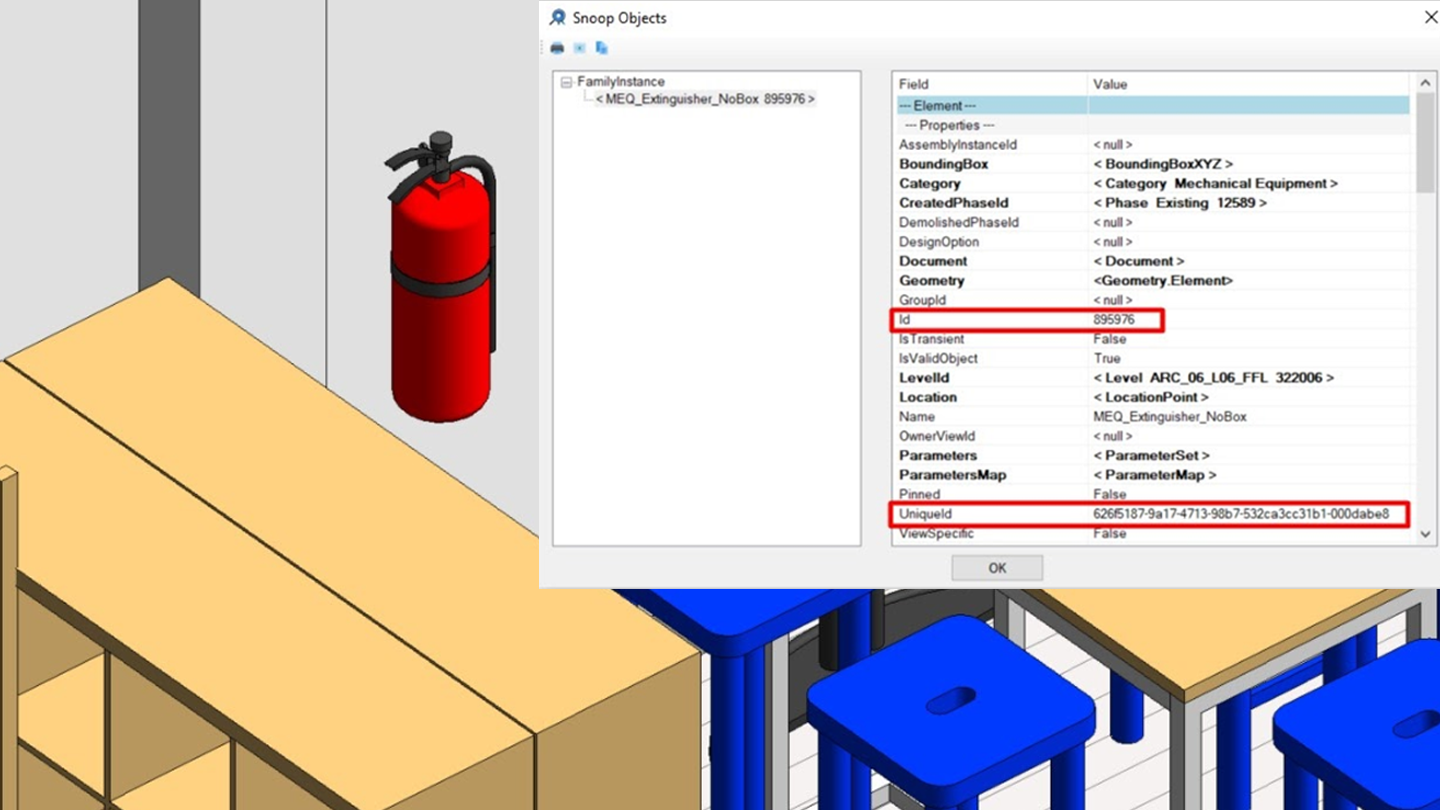
The Unique Id can be broken down in two parts:
- The first part, including the characters of the sequence 8-4-4-4-12 is usually called “EpisodeId”, and refers to the project and the session.
In the example: 626f5187-9a17-4713-98b7-532ca3cc31b1 - The last 8 characters are those related to the ElementId of the element. It is the hexadecimal conversion of the ElementId.
In the example: 000dabe8 = 895976
When exporting from Revit to other formats such as *.dwg or *.ifc, a GUID is generated for each exported element. This GUID may be generated in a different way depending on the nature and origin of the element. If the element origin is Revit, the GUID generated is obtained from the UniqueId of the element.
The generated GUID is unique and consistent throughout successive exports. That GUID will be the “DWF GUID” in case of exporting to *.dwf, and it will be encoded in the 64 character base in order to be converted into the “IFC GUID”.
Frequently Asked Questions
Is it possible to find two elements with the same ID within a model?
- ElementId: No, there cannot exist two elements with the same ID in the same model.
- UniqueId: No.
Is it possible to find two elements with the same ID in different models?
- ElementId: Yes
- UniqueId: The possibility of two independently created elements having the same GUID is so low that it is not considered. An exceptional case would be when a model is copied. In that case the elements of the copied model would keep their original GUID and therefore would be repeated in both models.
Is it possible that the ID of an element changes?
- ElementId: Yes, but it is very unlikely. An example could occur when working collaboratively with the same model. The same Id may be generated for two different elements in two local files working at the same time, and when synchronizing to the central model, one of the two elements changes its ID to avoid duplications.
- UniqueId: Revit’s API documentation defines the UniqueId as a unique and stable identifier, which does not change over time, and therefore can be used to identify an element over time. However, some users have found cases of inconsistencies with the UniqueId (see link below).
Is it possible that a new element takes the ID of an element previously removed from the model?
- ElementId: Sí, it is a rare case, but it is possible.
- UniqueId: No.
BIM codes use during the O&M phase
If we want to link an element of a BIM model with an entry of an FM database, we need a code that uniquely and consistently identifies the element on each platform. These codes will not necessarily be the same on both platforms. In case that the identification code of the element in the BIM model is different from the entry in the database, we will need to store the relation of the two codes of every element in order to enable the transfer of information of the element between both platforms.
With regards to the unique identifier in Revit, there would be two options:
- Use the UniqueId: In the case of Revit, Autodesk defines the UniqueId as a unique and stable identifier, which can be used as an identifier for external databases, and therefore, useful for this purpose.
- Generate a custom code: It can be a variation of the ElementId or the UniqueId that ensures that the generated codes are unique among all models of the project. In these cases, the codes are created and maintained by the user, and therefore it is very important to establish the procedures of creation and maintenance of the codes in order to avoid inconsistencies. Another option would be generating a custom GUID different from the UniqueId using the Revit API. For both cases, we recommend keeping the code as short as possible. Adding prefixes that provide information about the element may be detrimental if the result are too long codes or codes that cannot be automatically maintained as they need user inputs.
As a summary, the internal identification of BIM elements is a complex issue that we need to understand if we want to link them with external information sources, like FM platforms, and maintain that relation over time.
We look forward to your comments.
References
GUIDs general explanation: (http://bimtoolbox.org)
Revit UniqueId, GUID and IFC GUID relationships:
(https://thebuildingcoder.typepad.com)
UniqueId inconsistencies and possible solutions:
(https://thebuildingcoder.typepad.com)
Authors: Alberto Ramos and Juan Manuel Pérez.