

BIM modelling and consultancy for FM
Office campus in Alicante
The use of BIM for Facility Management is an emerging application that takes benefit from the information contained in the models for the maintenance and management of buildings during its lifecycle. However, in order to make the most of BIM when applied for Facility Management, BIM models have to cover different needs that must be considered before and during the modelling process. This case study shows an example of BIM models specifically created to serve Facility Management purposes.
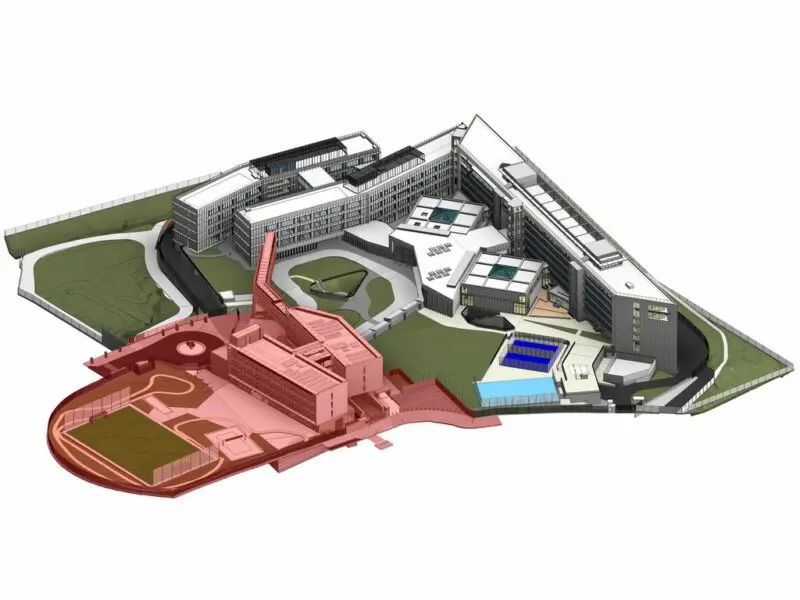
The project was about an office campus in the East of Spain, which includes three buildings from different phases over time. We were hired by IDOM to develop the BIM models of two existing buildings (as the third one was in construction at the moment of the project) and its surroundings, with a total surface area of 92.000 m², and to provide consultancy to the final client. The modelling included all disciplines, and the level of development was to enable its use for the maintenance and operation of the building. The works were completed between September 2018 and August 2020.
The main objective of the client was getting a reliable source of information of their buildings, and at a later stage, be able to connect the elements of the BIM model with their FM platform.
Starting Info
The initial information consisted of the compilation of the projects that had taken place since the construction of the buildings. The amount and type of information was very different between projects, and also minor refurbishments were usually not properly documented. This resulted in a huge amount of information that required a meticulous task of filtering and sorting, and even doing that, in many cases it was very difficult to reach the current state of an area through the record of the projects. This navigation and research through the available information was one of the main obstacles during the project.
However, despite having so much information, there were areas with gaps of information that made us consider the need for complementary reliable information.
To solve that, on the one hand, we scanned some specific areas of interest with the aim of checking exact dimensions. We processed the point clouds generated in order to reduce their weight and allow an agile handling from the Revit models. We created a reference BIM model where we linked the point clouds, for easy checking while modelling.
On the other hand, we took 360º photographs of practically all the rooms and surroundings of the campus. We then placed some family instances in the reference BIM model at the point where we took each photo. Each instance contained the path and name of the photo it was referencing. At Modelical we had developed a Revit addin called “DejaVu” that allows direct access to photos from Revit, using these families with the path of the files.
BIM modelling
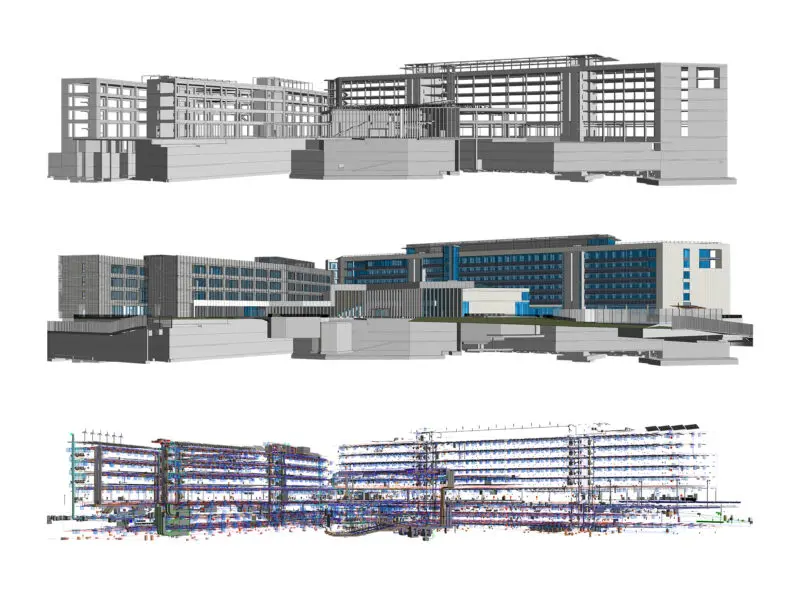
The first modelling decision was the model breakdown structure. The priority was getting a rational division of models, that maintained the size of the models small enough to enable a smooth performance, and oriented to the future uses of the models. Taking that into account, the model division followed these structure:
- By building
- By discipline: Architecture, Structure and MEP
- By sub-discipline (HVAC, plumbing, electricity, fire fighting and telecommunications)
Apart from that, some particularities were added. For example, the telecommunications model was subdivided into three models due to its future use by different suppliers. Also we created an independent model just with rooms due to the way that the client worked the space management. Sheets were separated into federated models that did not contain geometry but just sheets.
The model breakdown structure chosen was very successful as it allowed having a set of 22 models containing all systems and disciplines with a size of less than 100 Mb on the majority of them.
In terms of modelling specifications, the constraints were:
- Structure: Tolerance of 5 cm for structural elements (based on point clouds).
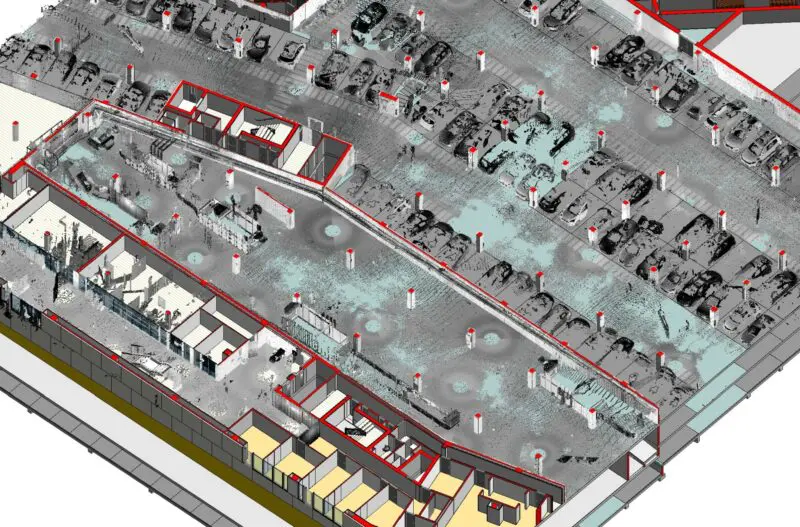
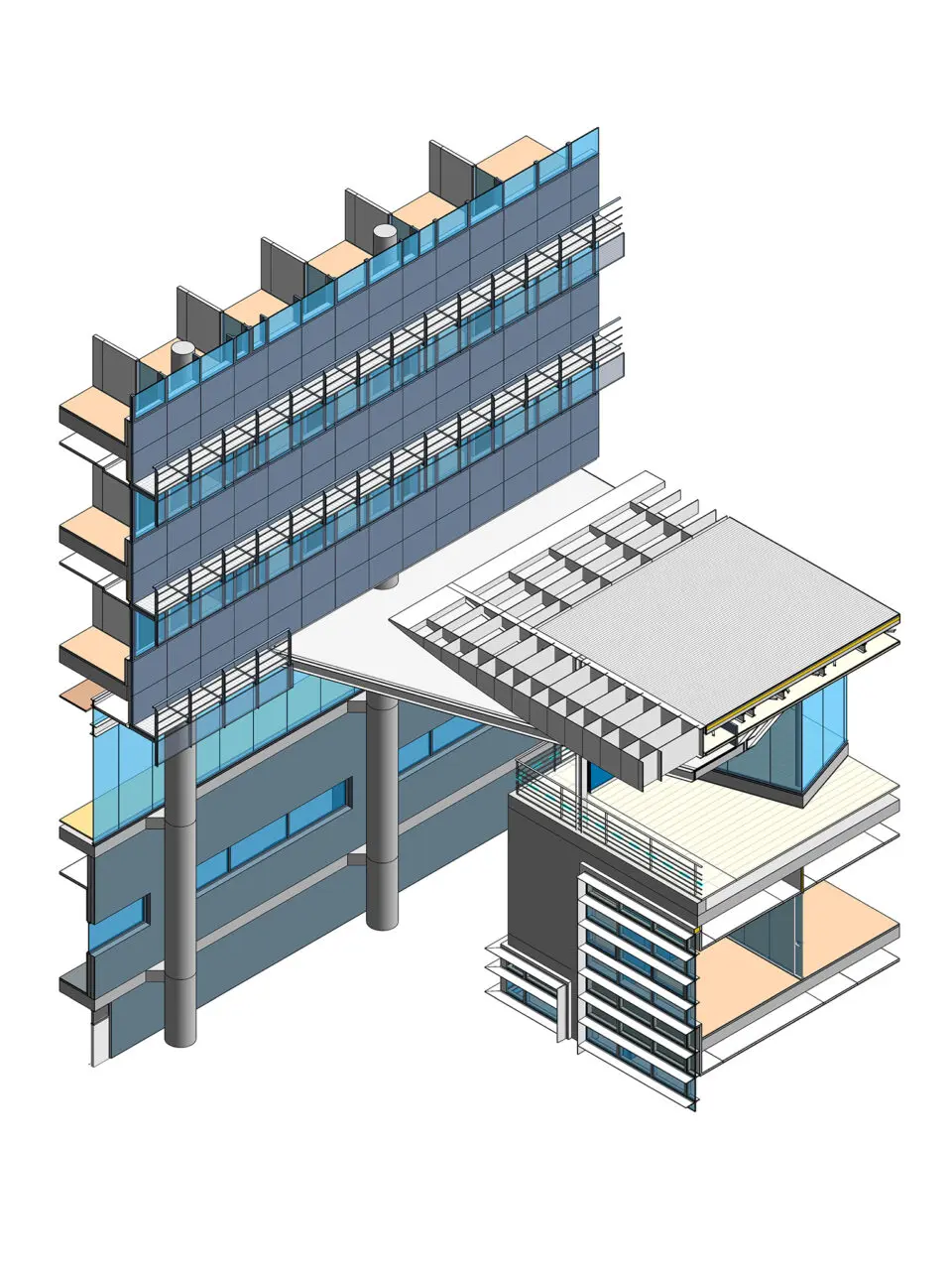
- Architecture: Façade and exteriors modelled following the point cloud in order to check main dimensions. We created simple families adapted to its future uses that allow a smooth performance and at the same time a good visualization with the required accuracy in their main dimensions.
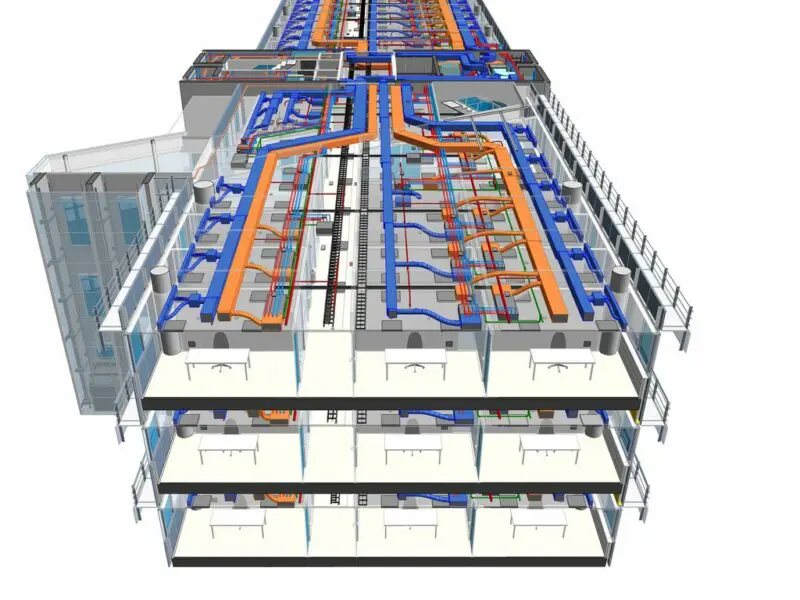
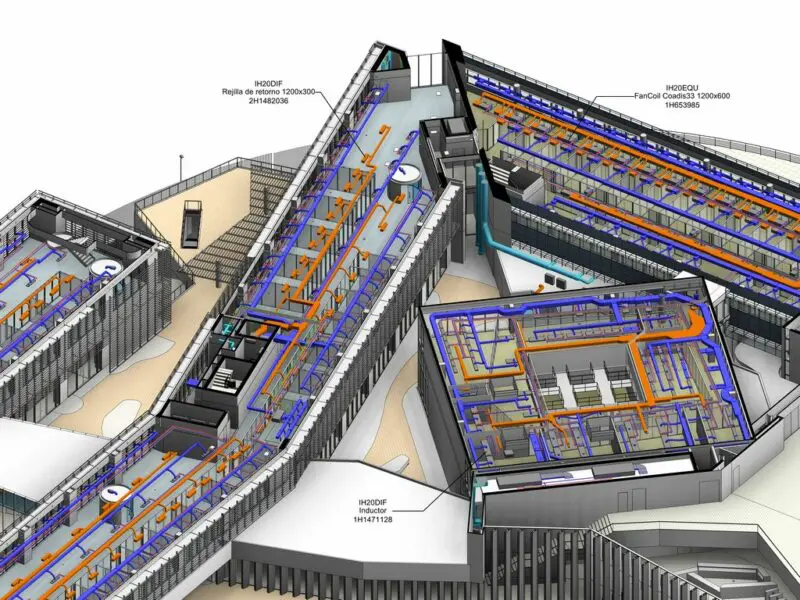
- MEP: Modelling of all systems layouts. The information of the elements and their connections were much more important than their geometry. Thus, MEP families were simplified in 3D, including 2D symbols for its representation and the proper set of connections and parameters. We paid special attention to systems with no-physical connections, like in electricity. All fire detection, electrical connections or BMS relations were included as information in parameters or as Revit native connections. There were also some small details that helped to add information to elements without making them more complex, like including photos of the electrical panels in the elements of the BIM models.
Parameterization
With regards to the information contained in the elements, models had to enable the inventory of elements subject of maintenance and the future connection with the FM platform.
We used the following parameters to codify and identify the elements:
- Id: The most important parameter. This code uniquely identified the element throughout all models. It was the combination of a two-digit prefix of the model to which it belonged, followed by an identifying (and unique) code of the element within the model. Its creation and verification were automated to ensure it was always unique. This was the parameter chosen to subsequently establish the relation of the element in BIM with the other databases of other platforms used for FM.
- Type code: Consisting of a 7-digit alphanumeric code, used to group objects by discipline and constructive function.
- Location: Showing the coordinates X, Y, Z of the element with respect to a point chosen as the origin of coordinates. It resulted in very precise information but not very indicative for most users.
- UT: Showing the Technical Location where the element was located. Very indicative for a first idea for users but not enough to identify the item accurately.
Apart from that, a list of parameters was associated with each element according to its category and function, containing all its specific information.
Quality control
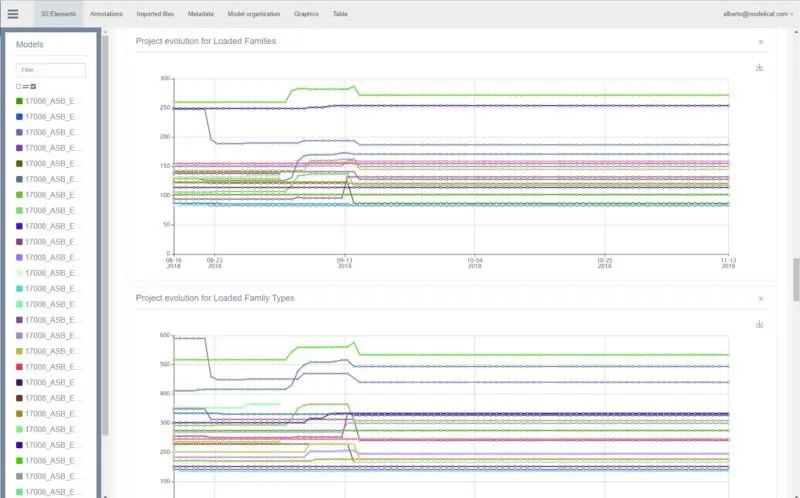
Quality control is a key aspect in large modelling projects as this one. It is necessary to establish regular procedures to ensure it. In this case we used a custom tool developed by our team called Baywatch (you can learn more about it here) to control the quality of the models. This tool regularly performs quality tests to the BIM models and displays it in a web platform. With that, it was easier to check the evolution of the models and identify when a measurement was out of the allowance.
We also used this tool to batch-extract information from elements of all the models of the project, in order to easily check the consistency of the data. We filtered the elements and parameters to be extracted and created periodic reports.
After several months of hard work we finally delivered the set of complete BIM models ready for FM integration. Our client now has a reliable source of information of their buildings, that can be used to extract any graphical document needed, accurate quantities of elements and information that can be synchronized with their FM platform.
Case 2: New building As-Built BIM model to FM BIM model
We have just explained the creation of FM BIM models from scratch. However, while we were modelling the majority of the campus, the construction of a new building in the campus just finished. As a result our client got the As-Built BIM models. Unfortunately, those BIM models began before the definition of the corporate BIM standards, and as a result, they were not consistent with the rest of the BIM repository.
The client requested us to transform the As-Built BIM models received into BIM models that meet their BIM standards, and that allowed its use for their FM operations.
Our main tasks in this project were:
- Coding and naming of the elements: Naming and coding according to the corporate standards in order to allow integration with the management systems.
- Ordering the information: Include the agreed set of parameters needed for the FM operations. A great majority of the information was already included in the elements but hosted in different parameters and formats.
- Filtering all the construction information that was not needed for FM operations, in order to improve the performance of the models.
- Adapting the As-Built models to the FM model breakdown structure.
- Adapting to the corporate BIM standards: In terms of coordinates with the rest of the models, families used, internal organization of the models and modelling specifications.
Conclussion
From these two projects we gained a lot of experience in the topic of creating BIM models for Facility Management, and we extract some lessons learnt:
- Clearly establish the objectives and scope of the modelling together with the owner. That will define how the elements will be modelled, the structure of the models and the parametrization.
- Carry out an initial work of sorting and filtering the initial information.
- Identify the elements and information to be monitored for the Facility Management phase. Not everything should be monitored, nor should all the information be on all platforms. Avoiding duplicated information is key, and for that it is important to define which platform is going to be the source of data and for each information.
- Establish the coding of the elements of the models. Define the master parameter(s) for the initial identification of the elements. There must be a code that univocally identifies each element, that will be then used to link the element with the databases of the other platforms. It is also important to define the procedures for maintaining this coding.
Please share your opinion in the comments and if you want to know more about our experience in BIM for Facility Management please contact us!
Felicitaciones para ese projecto!! Me encantaria saber muchisimas otras cosas porque ahora mismo estoy haciendo un trabajo muy simil!
Ehnorabuena!!!
Antonio
Muchas gracias Antonio!
Si quieres saber más puedes contactar con nosotros y te contamos:
contacto
Muy interesante lo explicado! Compartir estos temas es importante para los futuros proyectos y así, poder sacar lo máximo del Revit. Gracias y felicitaciones por el trabajo!!!
Muy interesante . Soy un estudiante de ingeniería civil, estoy a mitad de ciclo y me encantaría aprender todo sobre está filosofía y aprender sobre Revit, si habría alguna forma de poder enseñar me gustaría saberlo. Gracias y saludos
Muchas gracias.
En nuestra web puedes encontrar muchas guías y post gratis que te pueden ayudar a empezar.
Si prefieres vídeos, puedes pensar en suscribirte a campus, nuestra plataforma de formación online:
https://www.modelical.com/es/campus/
Enhorabuena a todo el equipo! Por el logro conseguido y por compartir esta información tan útil y educativa. Es importante mostrar al mundo como dividiendo los grandes retos en retos más pequeños todo es posible y que se entienda el el esfuerzo que lleva hacer las cosas bien. Sin haber podido trastear con el modelo, no cabe duda de que habéis alcanzado un grado de excelencia que pocas empresas están en disposición de ofrecer. Bravo!!!