

The National Museum of Qatar Project
Some notes on information management
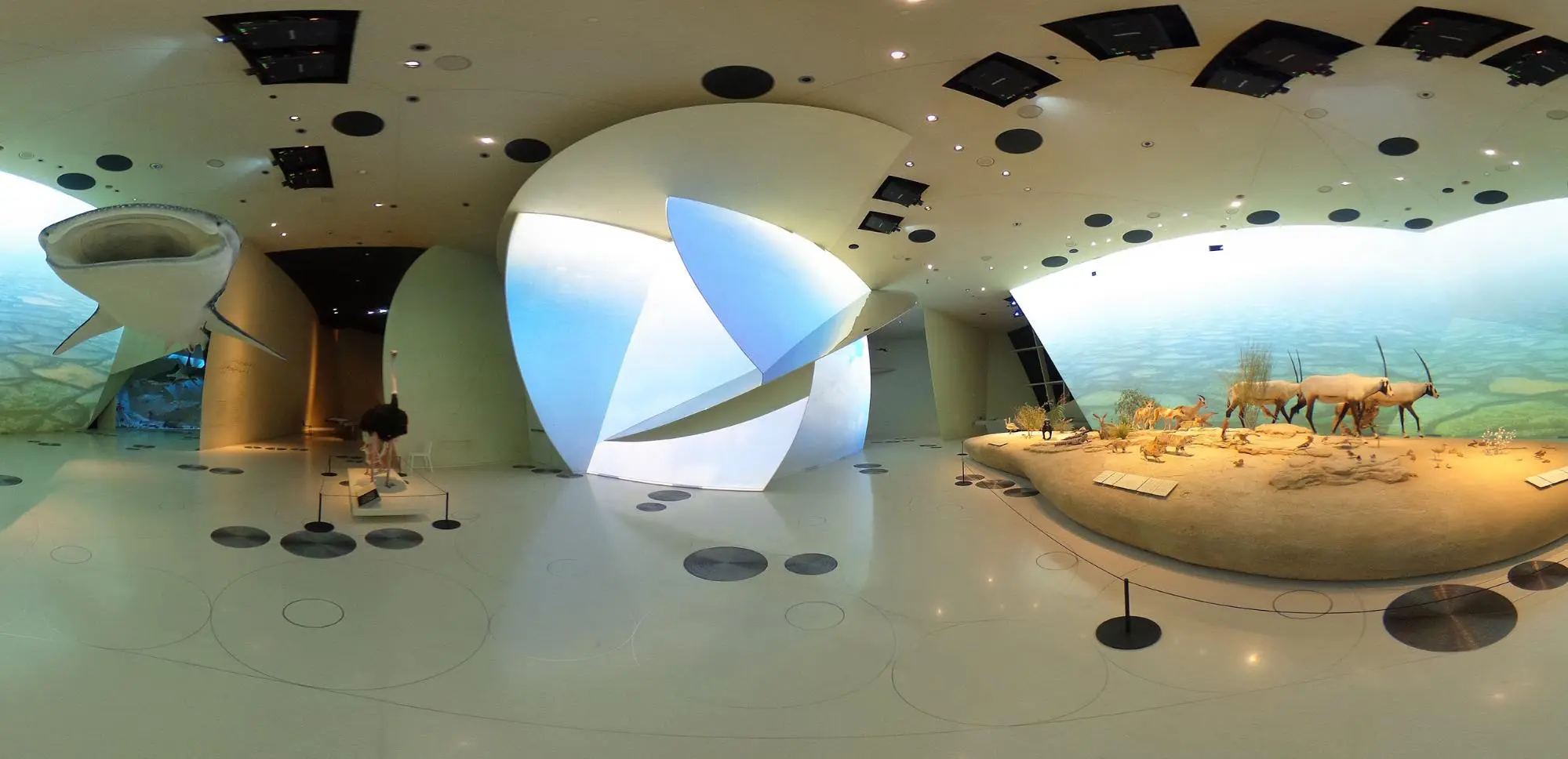
>Panoramic view of Gallery nº. 2 of the NMoQ as shown in the model through our DejaVu app
I think I am not mistaken if I rate the National Museum of Qatar (NMoQ) as one of the most unique projects of recent architecture in the Middle East. Ateliers Jean Nouvel’s project has been a real challenge for all of us who have had the opportunity to work on it.
This article focuses on the information modeling aspect of the museography elements (exhibition elements, audiovisuals, etc.) so that they can be incorporated in a Facility Management (FM) strategy. But first, a little context…
In 2017, Qatar Museums awarded the execution of the museum’s museography project to the Design Joint Venture formed by EMPTY SL – a leading spanish construction company with a superb museographic track record – and MAN Enterprise. From the interpretation of the project’s ambitious BIM requirements, to the design of the BIM methodology, Modelical helped the successful execution of the project. Several hurdles had to be faced that made this a highly complex enterprise. Amongst others, we can highlight:
- A truly demanding architecture, where – its architect words – even the walls that seem vertical, in reality, are not. Multiple intersecting spherical discs create the reference surface for finishings, structural and service elements, where inclined floors seamlessly merge with walls. All of this geometrical complexity was created in Digital Project: a BIM authoring application developed by Gehry Technologies on top of Dasault’s CATIA. Furthermore, DP is a notably complex, expensive and hard to master design application.
- A record model created in DP which was a challenge on itself. A large hierarchical assembly of thousands of interconnected ‘Parts’ or partial models from all the manufacturers involved in the contract.
From a Facility Management point of view, our work consisted mainly in:
- Helping the team to keep the right amount of information in the model, not more, not less.
- Maintaining information consistency. This required finding and eliminating duplicate data or information gaps between the multiple information tables and the model.
- Finally, ensure that the model is the source of spatial and geometric information for all of the museographic exhibits of the project.
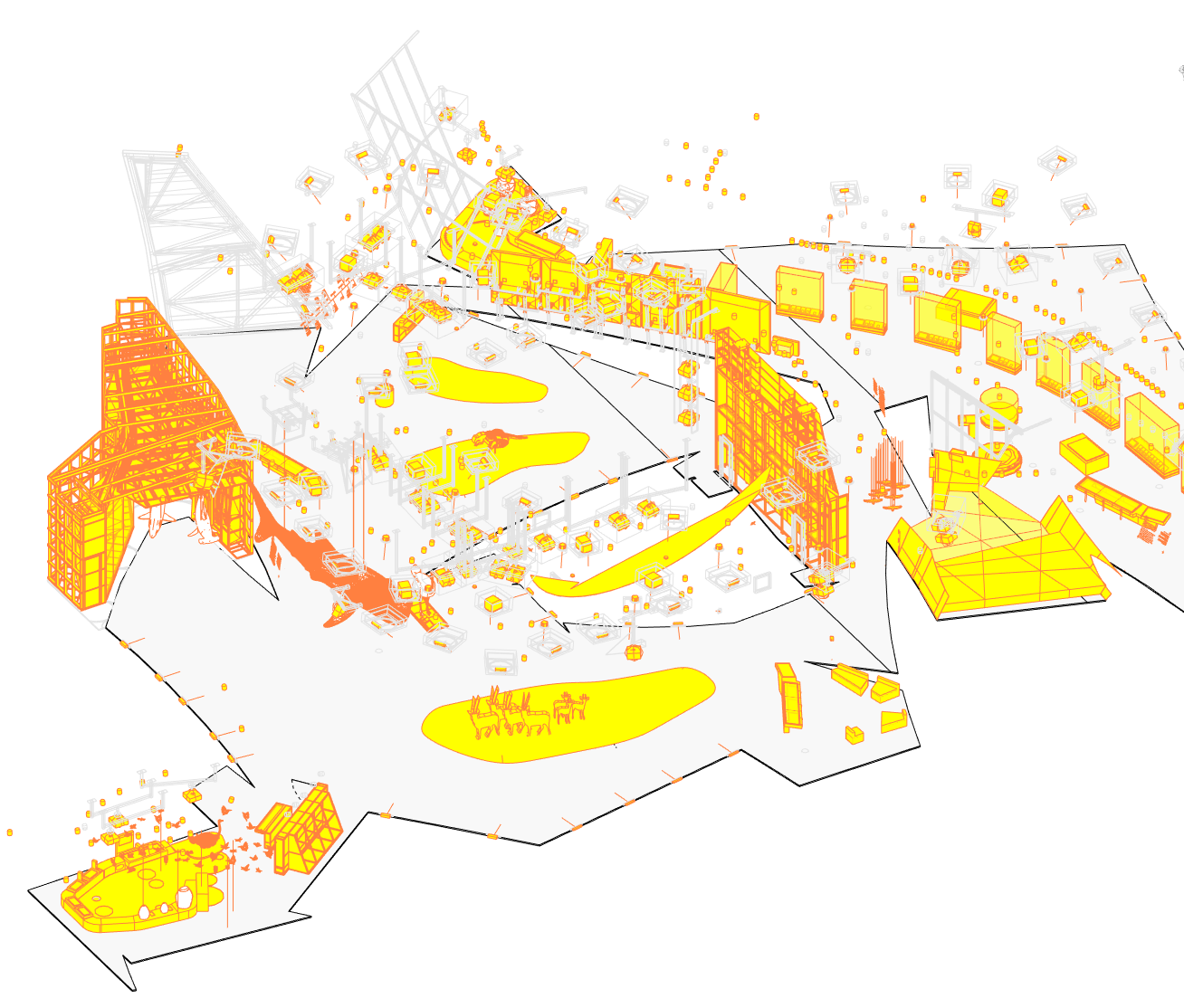
View of the model showing items subject to maintenance (coloured in yellow)
Why is it important to maintain only the necessary information in the models, and not more nor less? Because of negative bias: the tendency we humans have to weigh more in our perception negative inputs than positive ones. In other words: when we find some incorrect data in the model, we tend to mistrust all the data. Therefore: if we limit the amount of information in the model to what is necessary at any given time, we will be able to better guarantee data integrity and correctness. The outcome of this limitation is greater confidence in the model by all users.
To maintain the consistency of the information we have developed some ideas that will already sound familiar to you, as we have talked about them in other publications:
- Clearly identify model elements subject to FM with a parameter that marks them as such.
- Assign to each element subject to FM a unique code, this will be the key to reference data with the rest of the project information sources (tables of technical data, warranty information, etc.)
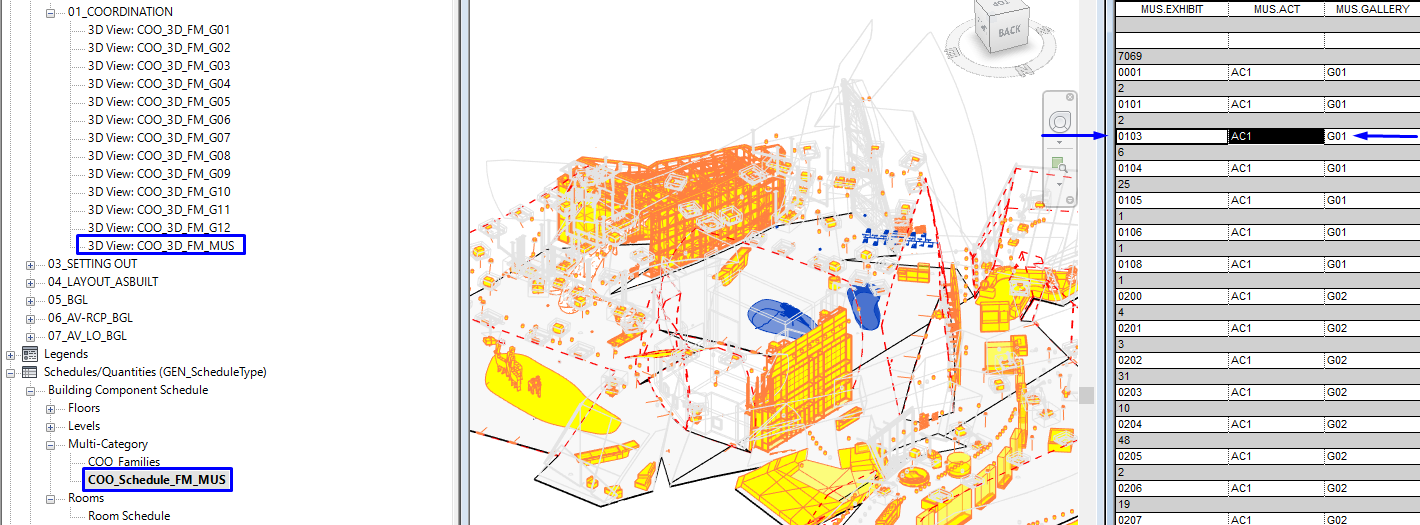
Elements subject to FM in a gallery are identified by their exhibition item number
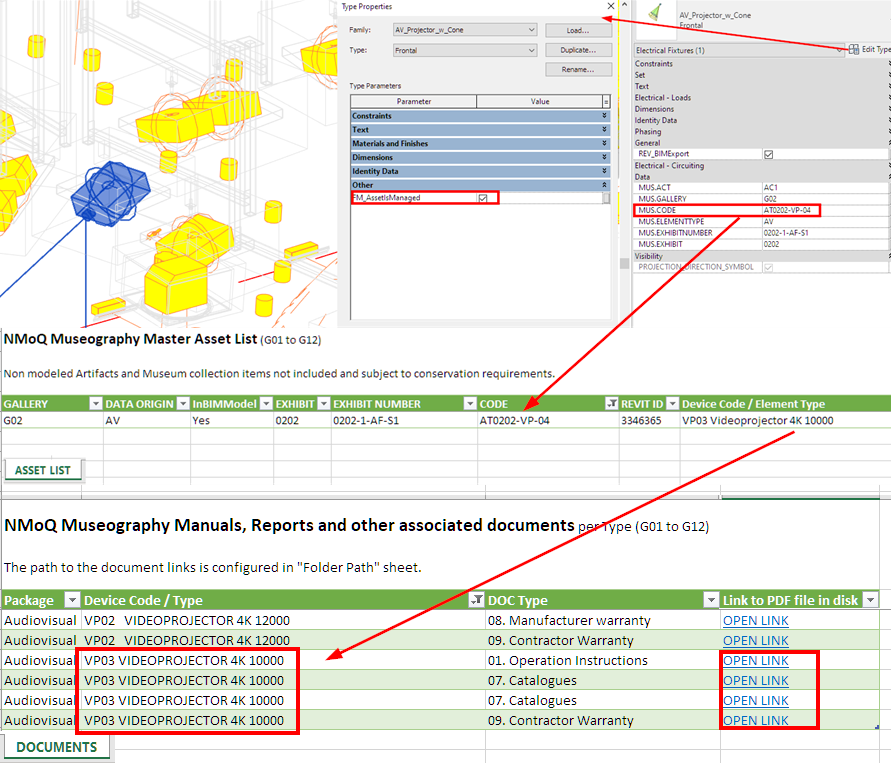
The given unique code and type allow us to link a modeled item with non-modeled information such as PDF documents, datasheets, etc.
Once we have modeled elements perfectly identified with a unique code, we can establish relationships with the rest of the information sources in other platforms and formats. This helps us keep only relevant information in the model, while each specialist – with their respective data sources – can maintain and update whatever information is important to them knowing that there is a link to the particular item shared with everyone else.
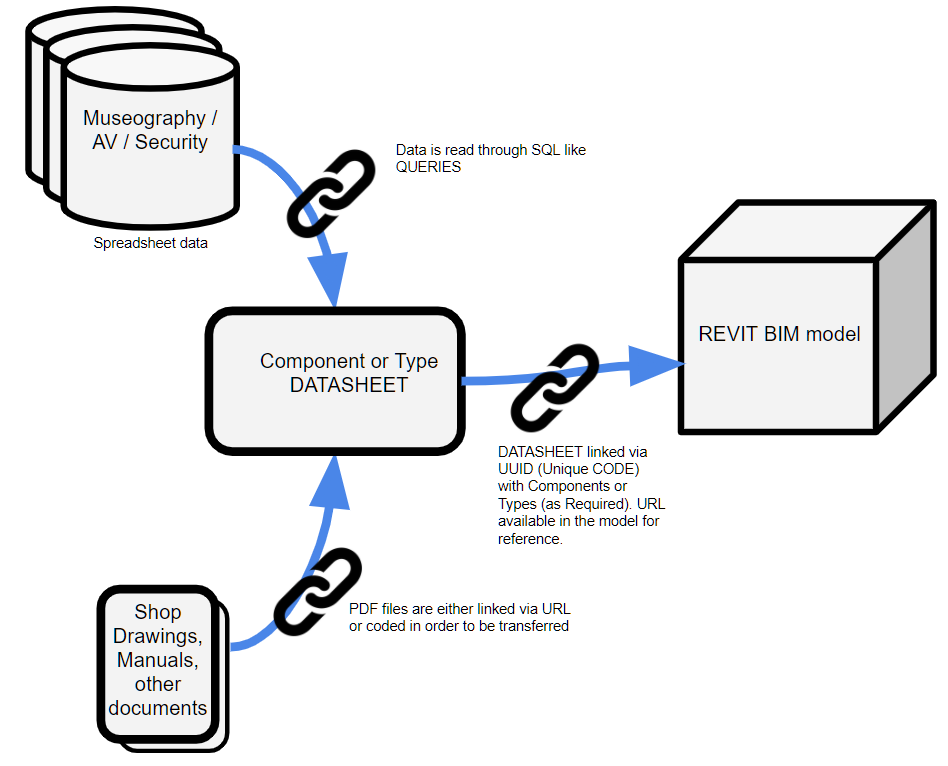
Data flow and connection with the model
In an ideal world, we would use a database to centralize all the information and make it accessible to the entire team in a safe and controlled way. Sadly, different factors such as the cost of licenses may prevent this. The best scenario would be to be able to integrate a Computer Assisted Facility Management platform (CAFM) in the initial phases of the project. This situation, however, does not usually occur since it involves different work packages and providers.
In the case at hand, as in so many others, we found out that the lowest common denominator when it comes as a vehicle for transmitting information is Microsoft Excel. Its use is widespread as a data entry and management tool. However, how can one establish controls and verify the accuracy of data with it? Remember: Excel does not guarantee referential integrity as a database would.
Enter Power Queries!
Power Queries in Excel let us:
- READ data from multiple sources and maintain the link with it. For example: read from multiple CSV files or different excel workbooks or worksheets.
- RESHAPE the data parametrically to be able to compute it or filter it as needed without breaking the link. For example:
– Clean or trim strings to remove spaces, wrong values, etc
– Pivot or unpivot data to make it computable - CONSOLIDATEdata from multiple sources into an excel sheet. Creating combined tables or cross referenced tables, much like SQL queries.
Data queries also allow us to perform quality control of data:
- Find, track and remove duplicates
- Find omissions or orphaned data
- Flag incorrect data through checks or controls of ranges of values, etc.
If you want to know more about queries, take a look at our web guide on power queries.
In the case of the audiovisual installation of the National Museum of Qatar, one of the largest and most complex in the world, we managed the information of each element with a structure of excel tables related through queries. This setup allowed geographically dispersed teams in Madrid, Barcelona, Seville, Malaga or Doha to work together consistently. The master tables for each area of the installation – AV, Projectors, Servers, etc. – were set up by the EMPTY’s AV coordinator. Afterwards, they were connected with the BIM model allowing all the non-modeled information produced to be linked with modeled elements.
To iron out the process of uploading manuals and PDF documentation related to museum elements, each subcontractor was given a customised online form that established the necessary connection so that all the documents could be correctly linked to all elements of their same type in the models and other data tables.
Enforcing consistency in the data entry process and the use of periodic automated checks made possible that the information in the models was kept updated and correctly cross-referenced.
Lessons learned
- Every piece of information that we enter in a model needs to be managed and maintained. It is essential, then, to limit the complexity of the problem by keeping the information in the models to the minimum necessary.
- Think about implementing the role of data manager or project information manager in your project. It is an essential figure to ensure data consistency.
- A management strategy for non-modeled information and its relationship with BIM models must be discussed and implemented as early as possible.
- Information must be periodically reviewed and curated to ensure that it does not rot and becomes obsolete. Wrong data in the models will negatively affect the team’s confidence in the information delivered.
Author: Iván Pajares.