

How can we hide joins?
Helpdesk
How can we hide beam and column joins?
Introducción
The discipline of structures also has its difficulties when it comes to getting a correct visualization, and we need to be attentive to all the details.
The following case is from a user who encountered a problem when making structural joints.
Question:
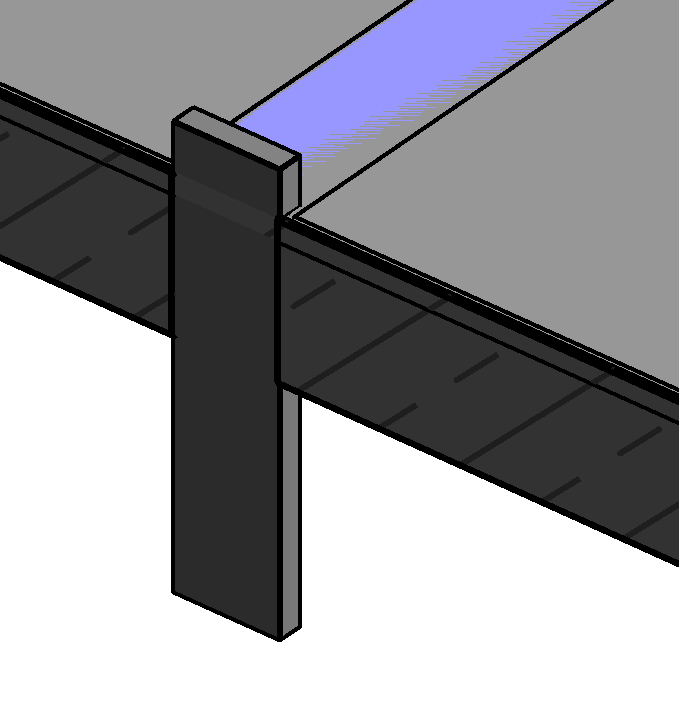
We have an issue with the geometric join between beams and columns. The beams are modelled from grid to grid and we need the line that displays the connection to the column to disappear. At the moment this is not happening as the beams are not joined to the pillar. This is a problem because we have to generate elevations of all the structural sections to detail the reinforcement and the graphic representation is not correct.
In addition, the project is large and masking these lines manually is not feasible. It is also not possible to model the columns below the beams, as there are areas where the beam is narrower than the column and the column must reach the slab.
Answer:
As shown in the image, we assume that you want to avoid the separation line between beam and column in this section.
If this is the case, you have to check that both, column and beam, have the same material assigned. If they do not have the same material, that change of material between elements will always appear.
It is not enough that both categories have a "By Default" material assigned to them, but it has to be item by item.
You can manage in a more efficient way with schedules.
Bonus track
Did you find this helpful? Leave a comment!
If you want to know more about modelling structures in Revit take a look at this guide Revit Structure Best Practices.
At Modelical we offer helpdesk support for companies. We have packs that attend to specific queries related to projects by e-mail. With this service, you will be able to deal with any kind of specific query, from a doubt or a problem in the development of a project to general advice and support in any of our tools and products.