

Grasshopper Scripting 108
Useful Stuff (II)
After the beautiful examples from 107, let’s see some more examples of iteration that are not easily achievable with plain GH, now involving more transformations and intersections.
Funicular Solver:
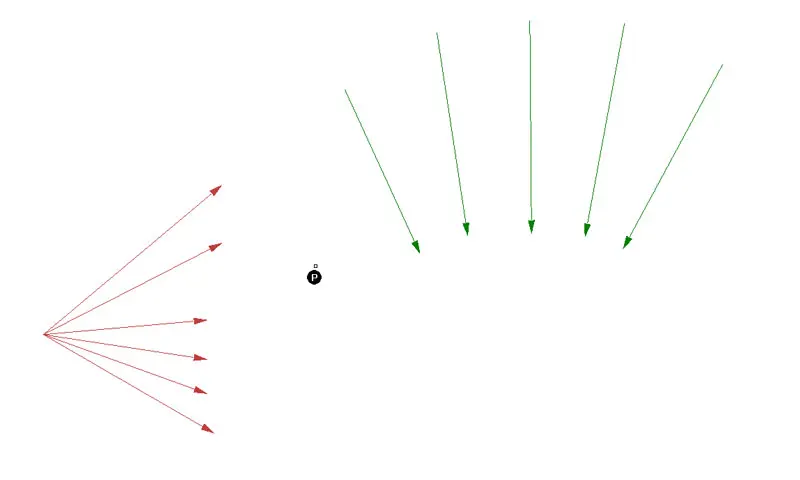
The problem is as follows. We have a set of lines (red), a set of infinite rays (green) and an anchor point. We want to build a polygon starting from the point, following the first line’s direction until we reach the first ray, then we continue with the second line’s direction until the second ray and so on and so forth until we run out of lines or rays. Two images are worth a thousand words:
From this…
We want to achieve this, with A parallel to each other, as well as B, C, etc.
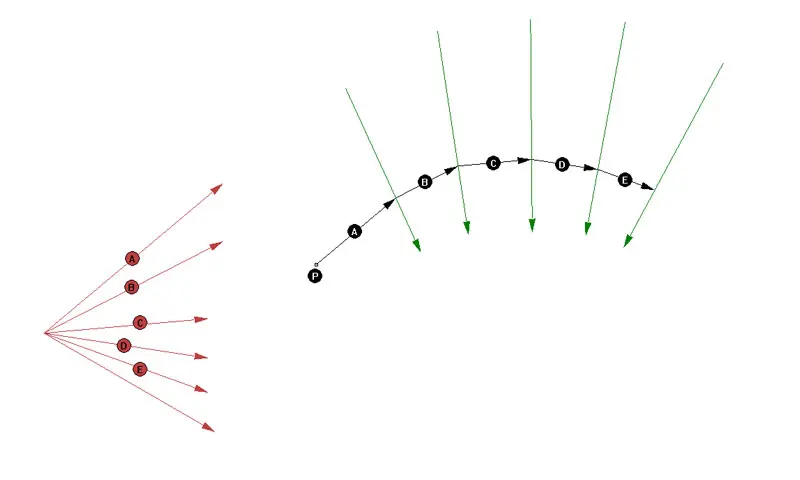
So let’s see some code:
  private void RunScript(List<Line> x, List<Line> y, Point3d p, ref object A)
  {
    //a little of care about our inputs is always good
    if(x != null && y != null && p.IsValid)
    {
      //see what we'll run out of before, lines or rays
      int c = Math.Min(x.Count, y.Count);
      //declare a list for our points
      List<Point3d> ptList = new List<Point3d>();
      //add the anchor point
      ptList.Add(p);
      //iterate through lines and rays
      for (int i = 0; i < c; i++)
      {

        //pick the current line and ray
        Line ln = x[i];
        Line ray = y[i];
        //find the starting point of the line
        Point3d pt1 = ln.From;
        //build a transformation between the current point and the start of the current line
        Transform xForm = Transform.Translation(ptList[i] - pt1);
        //move the line to its position
        ln.Transform(xForm);
        //holders for the intersection t values
        double lnt = 0.0;
        double rayt = 0.0;
        //perform the intersection
        if(!Rhino.Geometry.Intersect.Intersection.LineLine(ln, ray, out lnt, out rayt))
        {
          //if went wront, tell the user
          Print("Intersection at step {0} failed", i);

        }
        else
        {
          //if went well, create a point and add it to the list
          Point3d pt = ln.PointAt(lnt);
          ptList.Add(pt);
        }//end if
      }//end loop
      //start again with the newly added point

      //output the points
      A = ptList;
    }
  }