

Water Utilities: Bridging BIM and ERP Asset Management
Structuring BIM Delivery Information for Integration into Asset Management Systems
Water utilities are increasingly adopting BIM to design and deliver infrastructure projects. Today, BIM models are commonly delivered at project handover.
However, once projects are completed, these models are rarely used beyond design and construction. The main reason is simple: the data they contain cannot be easily integrated into asset management systems.
For asset owners and operators, the real value of BIM lies in its ability to support operations and maintenance. But, this requires BIM data to be structured from the outset in a way that aligns with how assets are managed in systems such as SAP.
Customer Challenge
Although BIM models were being delivered at project handover, customer teams could not use them in the client’s SAP-based asset maintenance system (CMMS).
The blocker was not the models themselves, it was the lack of alignment between BIM data and the maintenance system’s data model. BIM and CMMS systems define and structure information in different ways, which makes direct integration difficult.
In addition, customer teams were unable to clearly specify what BIM data was needed or how it should be structured to enable integration into the CMMS. This is a common situation, as asset management teams are not typically trained in BIM methodology or used to working with BIM models and BIM data.
Here is where the disconnect started:
“In SAP or a CMMS, assets are defined as equipment or asset entities. In BIM, these are represented as objects. Likewise, what asset management defines as attributes are represented as parameters in BIM.”
- BIM objects did not match asset entities in SAP
- BIM parameters did not correspond to asset attributes
- Naming conventions were inconsistent
As a result, asset information could not be transferred from BIM models into the asset register in the CMMS.
Modelical Approach
Modelical helped the client define a structured way to align BIM data with the asset management system.
1- Understanding the asset data model in the SAP-based CMMS
The first step was to analyse the data model of the client’s CMMS, identifying asset entities and their associated attributes. This analysis defined the information BIM models needed to provide.
“If SAP defines limits in terms of format, character length, decimals or units, these constraints must be reflected in BIM models. Otherwise, it becomes impossible to register assets in the CMMS from BIM data.”
In many organizations, this step reveals deeper issues. CMMS environments often evolve over time, accumulating legacy entities, duplicated attributes and inconsistent naming conventions. Before aligning BIM data, the asset system needs to be reviewed to identify what remains valid and what should be treated as legacy.
2- Mapping SAP-based CMMS asset entities to a shared classification reference
The asset entity names used in the CMMS could not be adopted directly in BIM models, as they neither followed a clear naming logic nor related to any recognizable classification system for engineering teams.
To make SAP entities usable within the BIM environment, they were mapped to a shared BIM classification system based on established, publicly available industry frameworks.
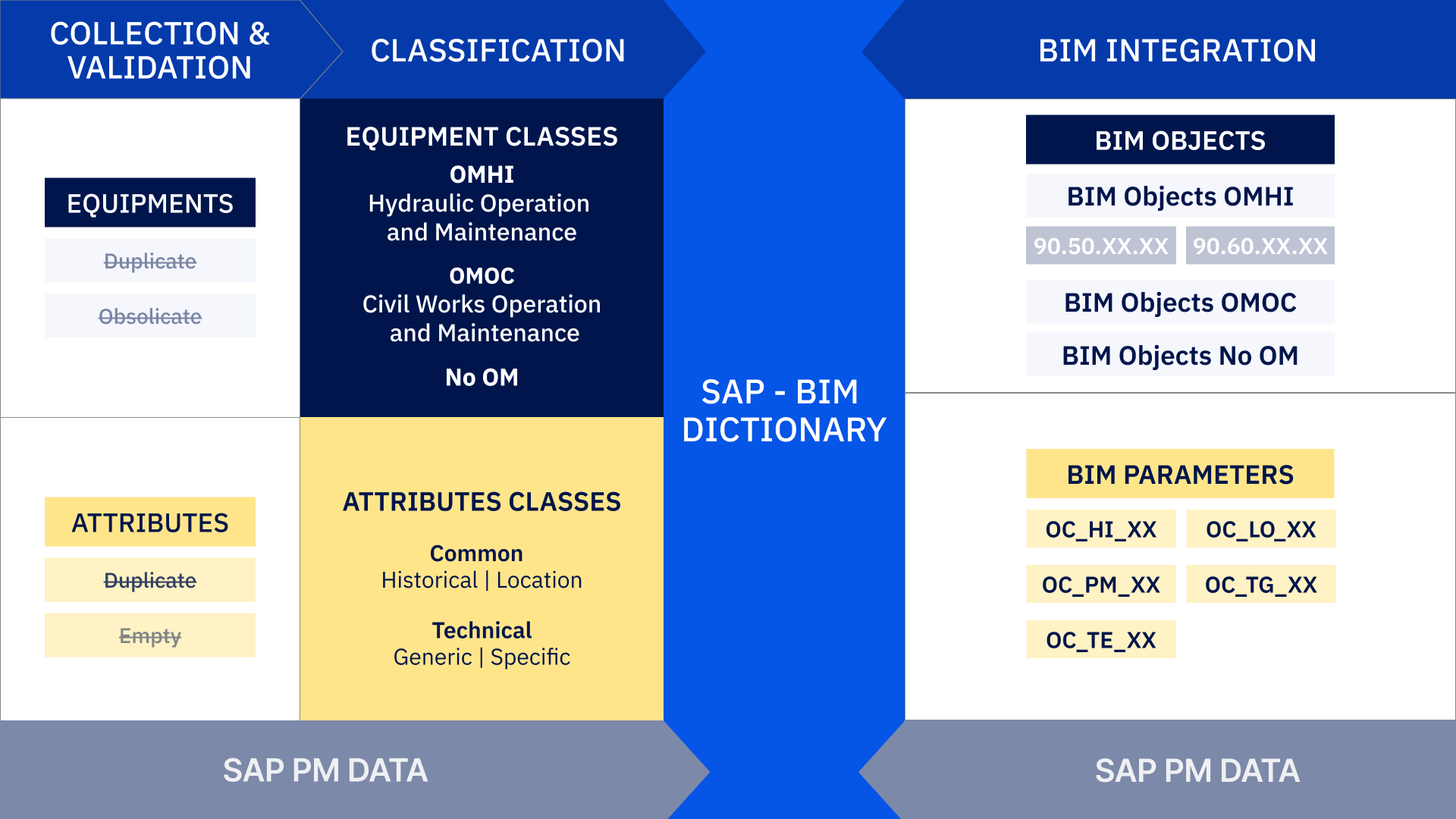
This mapping created a consistent basis for naming asset types in the BIM models and became the foundation of the data dictionary used to translate BIM information into the structure of the SAP-based CMMS.
3- Defining and structuring SAP-based CMMS asset properties
A similar disconnect existed at attribute level. SAP property names did not follow a clear naming logic, and many attributes were duplicated, incorrectly assigned or obsolete.
A review was therefore carried out to identify which attributes were still valid and how they should be matched with BIM parameters.
“We introduced concepts such as attribute types and scopes , defining whether an attribute applies to all objects, only to some, or only to specific equipment. This made it possible to organize asset data in a consistent way.”
The proposed BIM parameters were created using a clearer naming convention and grouped according to the type of information they contained, such as technical, functional or location-related data.
This structure was informed by established public reference frameworks. The outcome was a data dictionary that allowed BIM object parameters to be consistently mapped to the corresponding attributes in the SAP-based CMMS.
“We developed a data dictionary so that teams could understand how a BIM object represents an asset, and how BIM parameters are mapped to asset management attributes.”
4- Defining delivery requirements through the LOIN and EIR
All of these rules were consolidated into a Level of Information Need (LOIN) document, which defined the classification system for BIM objects and the attributes each object was required to contain. The LOIN also specified when this information had to be provided, depending on the project stage.
These requirements were then embedded into the Exchange Information Requirements (EIR), together with broader criteria related to model organization and modeling conventions.
The LOIN and EIR provided engineering teams with a clear and structured framework for delivering asset information through BIM models.
Customer Benefits
The project provided a clear framework to make BIM data usable in the SAP-based asset maintenance system.
- Data dictionary enabling consistent translation of BIM model data into the structure and language of the SAP-based CMMS
- Clear LOIN and EIR defining how asset information must be delivered in BIM
- Improved data consistency and reduced integration effort, making it easier to transfer asset information from BIM models into the CMMS
Key Insight
The challenge of integrating BIM into a SAP-based CMMS is not only technical — it is mainly about aligning how information is structured and managed.
SAP, as an enterprise asset management system, was not originally designed to directly integrate data from BIM models or from the built environment.
This project highlights three key success factors for integration:
- Alignment must start from asset management needs and the SAP data model
- Data translation and standardization are essential to ensure consistency across projects, stakeholders and sites
- Companies must plan asset data requirements from the start, clearly defining in the LOIN and EIR what information is required at handover. Otherwise, project data remains disconnected from operations and cannot be used in the CMMS
Organizations should consider BIM data as an opportunity to capture, from the project phase, a structured and reliable source of asset information that can be directly used in their asset management systems.
Potential Extensions
Once this framework is in place, BIM models can support additional uses beyond transferring asset data into the CMMS.
BIM data can help validate the current asset register, provide a 3D operational reference, support future links with systems such as GIS or SCADA, and represent asset systems and their relationships in a way that helps teams better understand how the installation is organized and operates.