

Desk Booking
How we book desks in Modelical using Odoo
Until 2020, in Modelical, each one of us had a more or less fixed desk, although the traits of our activity and the tools that we use had allowed us to work remotely so when the pandemic arrived and the lockdown was decreed, it was not a big change, since we were prepared to work from home.
When almost everything returned to normal, our team had grown, and our office began to feel a bit small. After some internal discussion the decision was made to follow a hybrid work model; each one of us could decide whether to work remotely or work from the office, also we could choose the number of days in each location, as long as we met minimum requirements for availability, ergonomics and connectivity wherever we were.
We arrived at a point where there were more of us than available desks, and yet, we didn’t use the office all at the same time, since many of us preferred to work from home some days of the week, or were in client offices, on vacation, etc.
Several questions came up:
- Do we need a larger office?
- How shall we control the occupancy of the office?
- How can I sit close to my project colleagues?
- What happens if I arrive at the office and I don’t have an available desk?
We were clear that if we didn’t resolve these questions, in the future we would find ourselves in a mess and it would mean that the team would come less and less to the office. We needed a tool that helped us control the booking of desks, and we evaluated different options on the market, including:
Skedda, www.skedda.com – Not only does it have a Hot Desking system, it also has a Space reservation tool, an interactive map, analytic, rules and Mobile App. Free up to 5 Spaces
Robin, www.robinpowered.com – In addition to a Hot Desking system, it also works as a system to manage guests visits, and a spaces reservation tool
Condeco, (www.condecosoftware.com – Focuses on returning to the offices after restrictions of the pandemic, has a system for guests, spaces reservation and hot desking
Interface Overload and Avoiding Extra Costs
All these applications have a pricing system that grows more or less linearly with the size of the team, which could lead to considerable extra costs if we continued to grow, so we thought we could solve this within our ERP Odoo, avoiding third parties. First, because it was our internal management tool, where we already had the team’s information (personnel directory, access rights, photos, etc) so we would avoid what we call interface overload.
Second, because of the long-term cost of a new software that we would also have to integrate with the rest of the tools; It would force us to maintain two lists of users and it would involve an annual license cost depending on the size of the team, while developing a new Odoo Module meant “only” an internal cost in hours.
The task was clear, we needed a system that would allow each team member to autonomously and easily book a desk, for a limited number of days -beware of hogs!- and taking into account that we use Odoo Online, so the scope of development within the application had to be limited.
We knew the limits, but we were convinced of the advantages of using an online/cloud system.
- All in one place; the desk booking application would be accessible from the same interface as the other core applications we use.
- Hosted in the cloud, allowing access from any location or device, which was important to ensure that the team reserves their desk in time.
- Integrated information, when adding or removing a colleague in Odoo, their access would be automatically managed.
- Scalability, in Odoo we wouldn’t pay extra for each person who had to use the application.
Implementation
We had to find a way to display a map of our office in Odoo. Without major developments, and thanks to the configuration of our desks, we though we could use Odoo’s Kanban View, a view that allows us to view cards organized by columns. This view allows us to schematically represent the distribution of our work posts.
Workflows and rules
The next step was to define the series of rules and requirements that the application had to respect:
- Some employees come to the office regularly and have a pre-assigned desk.
- The pre-assignment can be for every day or depending on the day of the week.
- An employee cannot book a pre-assigned desk if there is another free one.
- An employee cannot book 2 desks for himself.
- An employee who is pre-assigned to one desk, cannot book another.
- There are blocked desks (special ones with workstations available to everyone, or reserved for guests)
- The availability of desks are released week by week to create the habit of booking what is really going to be used.
For those of you who know how Odoo is structured, we create two new models: “Desks” and “Bookings”
In the Desks Model, we configure the records corresponding to each desk (in our case 30-50 records/desks), indicating the location, if it is blocked or available by default and if it has a pre-assigned user.
In the Bookings Model, we created new records for each day, taking information from the Desk Model, and establishing if for that specific day, the desk is blocked or available, or if it has a pre-assigned user.
To automate the creation of the Bookings Model records, we created a scheduled automatic action, which creates the “bookings” taking information from the Desks model, for the following 7 days as long as they were not already created.
In the same way, we created a scheduled action that creates the necessary filters to be able to display in the Kanban view only the records of each day (today, tomorrow, the day after tomorrow, etc).
We added photos of each employee in case a desk is reserved, and a status indicator. In this way we could know at a glance the status of the office.
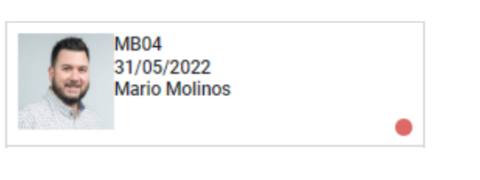
Thinking about the system, developing the application, creating rules and tests, all it took us three weeks of work and about 40 hours of dedication.
Thanks to the new Desk Booking Application, our team has the facility to plan their workplace in a simple way. In addition, it is easy to know the map of the office on a specific day and anticipate any space problem.
As always when a solution to a problem is implemented, the staff must adapt and make use of the tool. At the beginning, not all of us booked our desk, reservations were not respected, the system didn’t work as expected. But given the ease of use, in a few days the whole team got used to it and it became just another routine.
After some time using the new application, we have been able to have interesting metrics. We now have an idea of which days people prefer to do homework (Mondays and Fridays are the preferred days), seasons with more influx in the office (this depends on the projects in progress), attendance averages, the desks that they like the most, etc.
Thanks to a simple application created 100% with Odoo Online, Studio and a bit of imagination, we have gained in order and solved a problem that arose due to the growth of the company and the fundamental changes that the pandemic had brought us.
Is your office becoming too small? How have you faced the changes derived from covid?