

Which is the best format to export Surfaces from Rhinoceros to Revit?
Why would we use a workflow between Rhinoceros to Revit?
Rhinoceros and Revit are programs with different properties. While Rhinoceros is a good option for modelling complex surfaces and geometries with precision, Revit is a high quality program for modelling with information. So working with both programs in a properly way can easily implement and optimize our work. Most times we will use Revit as the main platform of work and just will need Rhinoceros to model complex geometry (mostly surfaces) that would be really hard to do in Revit.
Workflows between Rhinoceros and Revit
Thinking about the possible workflows between Rhinoceros and Revit, we point out these three options as the main ones:
– Direct import of the Rhino geometry (sat or dwg formats) into Revit scenery. This option is a valid one for volume reference in Revit, using the imported geometry without material properties.
– Import the Rhino geometry (sat or dwg formats) into a Mass in Revit. This is the best option to convert the geometry imported into native elements in Revit (floors, walls, ceilings and curtain walls).
– Import the Rhino geometry (sat or dwg formats) into a Family in Revit. This is an option to model complex geometry families in Revit.
Rhinoceros Surfaces Vs Importation in Revit
With the purpose to determine which is the best format to export surfaces from Rhino into Revit, we have analysed the main types of surfaces in Rhinoceros.
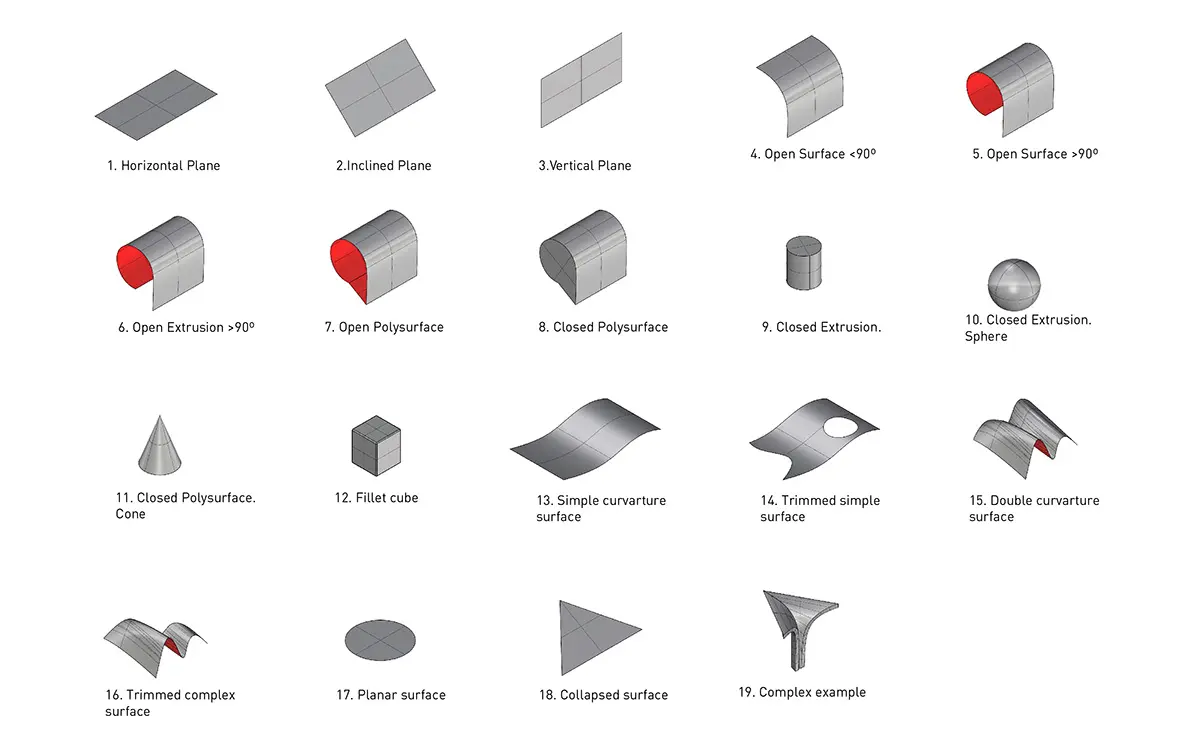
For each type of surface we have analysed how it works when we import them into Revit with different uses:
– Geometry Reference without properties in Revit
– Geometry Reference with material properties in Revit
– Conversion to Native elements in Revit
– Generate Families in Revit
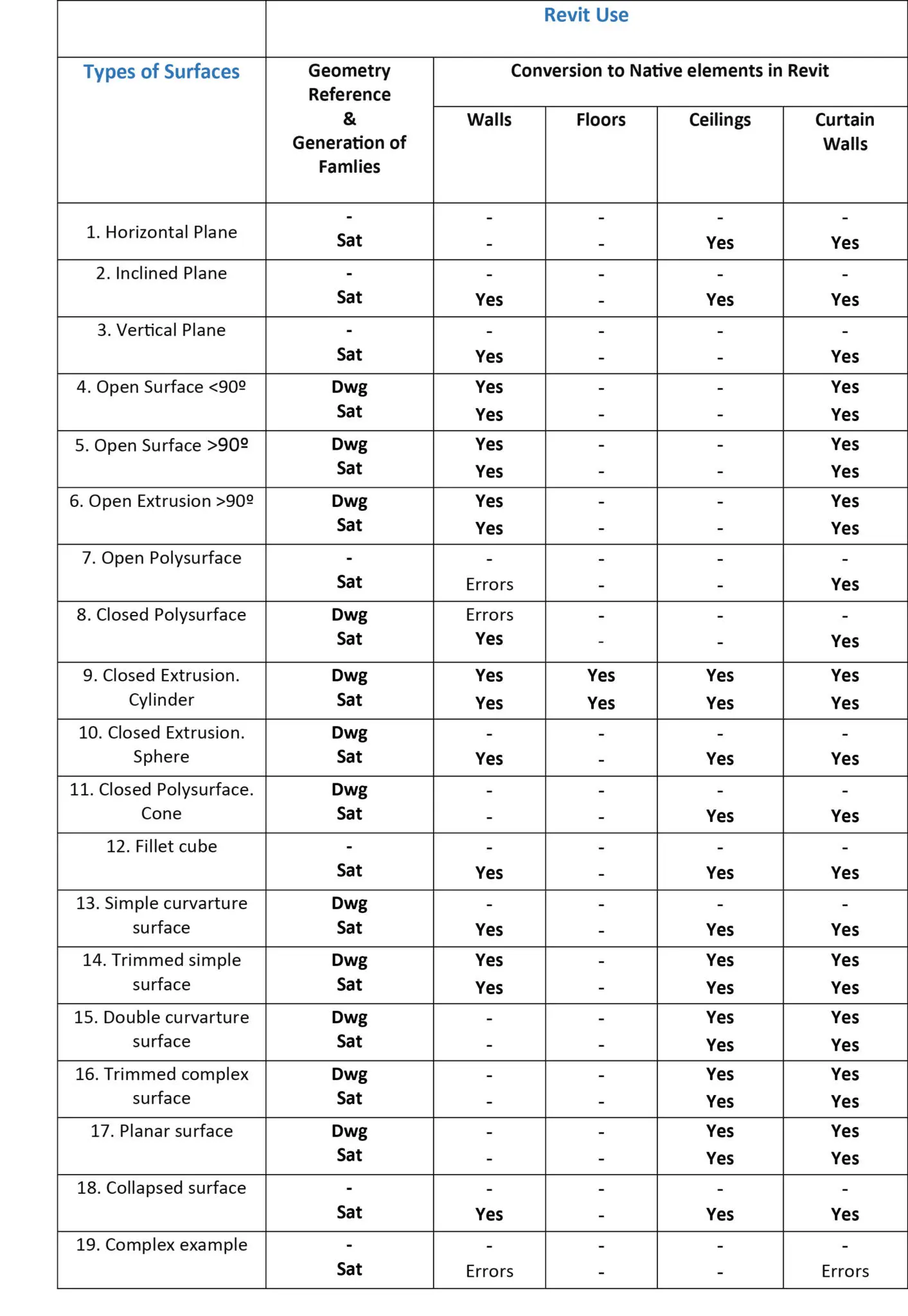
In order to have some useful data about the testings we have done, we have generated the following table with the conclusions of the studio:
Which are the characteristics of importing DWG files into Revit?
The importation in Dwg format shows problems both with very simple geometries (horizontal and vertical planes) and with too complex, especially open polisuperfices. Also, the imported geometry remains the source layers, which is important to manage the imported geometry.
When importing in this format, certain issues may become problematic. Some are permanent, always happen, others only in certain cases.
Permanent problems:
– The following surfaces cannot be imported in Revit in Dwg format: planes (horizontal, inclined or vertical), open or closed polisurfaces, complex surfaces and collapsed ones.
Occasional problems:
– Heavy files. If the imported geometry is complex it will increase considerably the size of the Revit file, thus will slow the rhythm of work and the visualization.
– Visualization: Tangent borders. Some geometries with curve surfaces may not be visualized correctly. Also in an elevation view it may occur to see incorrect lines.
Which are the characteristics of importing SAT files into Revit?
The importation in Sat format is considerably good, mainly with simple surfaces, while with complex surfaces it may occur some problems.
When importing in this format, certain issues may become problematic. Some are permanent, always happen, others only in certain cases.
Permanent problems:
– Loss of information from layers. When you import in Revit, layer information disappears, so you might have into account it before exporting the geometry for Rhino. One solution is to export each layer in Rhinoceros in a different file, so that we can manage the different files in Revit and apply different materials to each file.
Occasional problems:
– Heavy files. If the imported geometry is complex it will increase considerably the size of the Revit file, thus will slow the rhythm of work and the visualization.
– Visualization: Tangent borders. Some geometries with curve surfaces may not be visualized correctly. Also in an elevation view it may occur to see incorrect lines.
Conclusions:
Some of the main conclusions that can be drawn from the analysis of imported surfaces in Revit are:
– Generally Sat is a better exportation format than Dwg.
– Revit does not import planes.
– Revit is not a good software when importing complex surfaces: open or closed polysurfaces.
– When we import a surface to convert it into native elements in Revit, we have to be aware that some surfaces work for walls and some for ceilings, but rarely we will be able to convert a surface both into walls or ceilings.