

Slope lines simplification
Helpdesk
Slope lines simplification
Introduction
Both roofs and floors, in Revit, have different ways of solving slopes. The way in which it is done directly influences the projection display of the slope lines.
Let's look at a case of a question we were asked about and how to solve it.
Question:
How can roof slopes be simplified? We get too many slope lines and we don't know how to simplify them.
We have modified the outline of the roof, since there are some gaps, but now, there are too many triangulations.
Answer:
The problem appears if the sub-element is edited in a roof with a complex perimeter, since Revit facets with all those slope lines. A practical example can be seen in the following images:
1- There are 3 roof slabs: The first is rectangular, the second has a more complex outline and the third is also rectangular.

2- In the third, to achieve a more complex outline, we apply a vertical hole. In this way, when adding a point and modifying it, the slopes come out well, while in the second there are too many slopes.
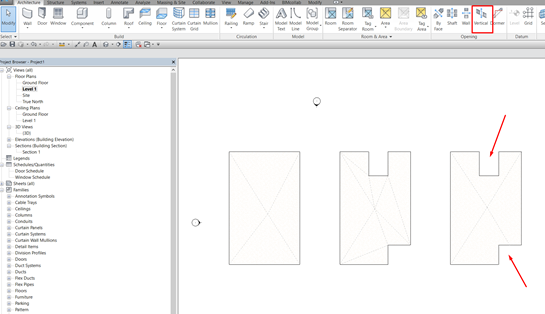
To solve the issue of roof slope lines, the roof should be modeled in parts that are as rectangular as possible, and these parts must be adapted to the contour of the roof by cutting them out by means of a vertical hole. Next step to comment on how to proceed:
1- Select into which parts the roof should be divided. Model a Floor as rectangular as possible for each part. By means of a vertical gap, adapt the rectangles to the contour of the slab.
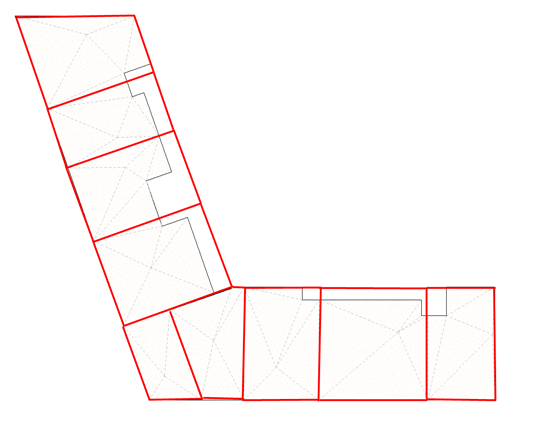
2- In this way, the roof slope lines will be simplified.
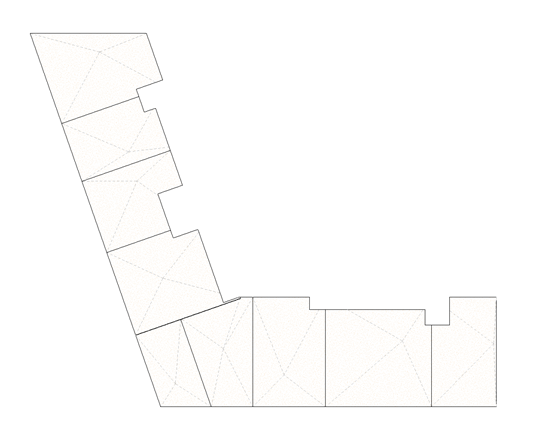
This is a situation that occurs on roofs, but also on floors, as long as there are slopes for water drainage.
Bonus track
Was it useful to you? Leave a comment!
Have you ever modeled all the roofs or floors in the same sketch in the design phase and then wanted to separate them into independent elements to define their properties separately? Take a look at our macro and apply it to your models!
At Modelical we offer help desk support for companies. We have packs that attend specific queries related to projects by email. With this service you will be able to attend any kind of specific query, from a doubt or a problem in the development of a project to general advice and support in any of our tools and products.