

Data Hierarchy
Configuration in Revit
Revit Data Hierarchy
File: OPE_RevitDataHierarchy
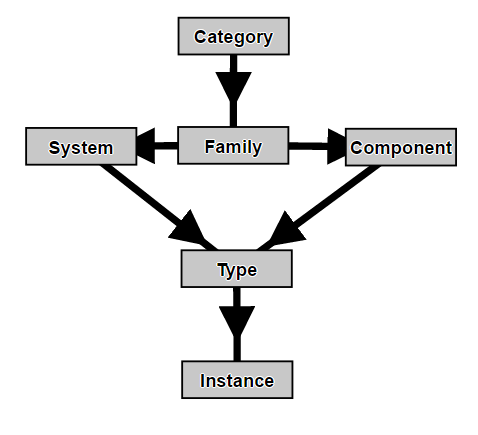
Objectives
Understand how data inside Revit models is organised, in order to define the approach when modelling and understand how any change affects to the model.
Prerequisites
- User will be using Revit, any version.
- User can at least open a model and knows the interface.
Hierarchy description
Everything that is part of a Revit model is an object. That includes 3D elements, 2D elements, views and sheets.
At the same time any object type responds to a structured hierarchy that organises data in models.
Object types in models
Revit uses three types of elements in projects: model elements, datum elements, view-specific elements.
Model elements
They represent the actual 3D geometry of the building and display in relevant views of the model. There are 3 types of model elements:
Hosts
Are generally built in place at the construction site. They are system families in Revit. They are called “Host” elements, because usually they host other model elements. Examples:
- Walls and ceilings
- Structural walls and roofs
Model components
Are all the other types of elements in the building model. Examples:
- Windows, doors, and cabinets
- Beams, braces, and structural columns
Datums
Help to define project context of the project.
- Grids
- Levels
- Reference planes
They are main references in the model, specially the “Levels”, because most elements in models are attached or referred to them. They are special also because although they are shown in views as 2D elements, and they are not displayed in 3D views, they are actually 3D elements.
View-specific elements
They display only in the views in which they are placed. They help to describe or document the model.
There are 2 types of view-specific elements:
Annotation elements
Are 2D components that document the model and maintain scale on paper. Examples:
- Dimensions
- Tags
- Keynotes
- Annotation elements.
Details
Are 2D items that provide details about the building model in a particular view. They are model-scaled. Examples:
- Detail lines
- Filled regions
- 2D detail components.
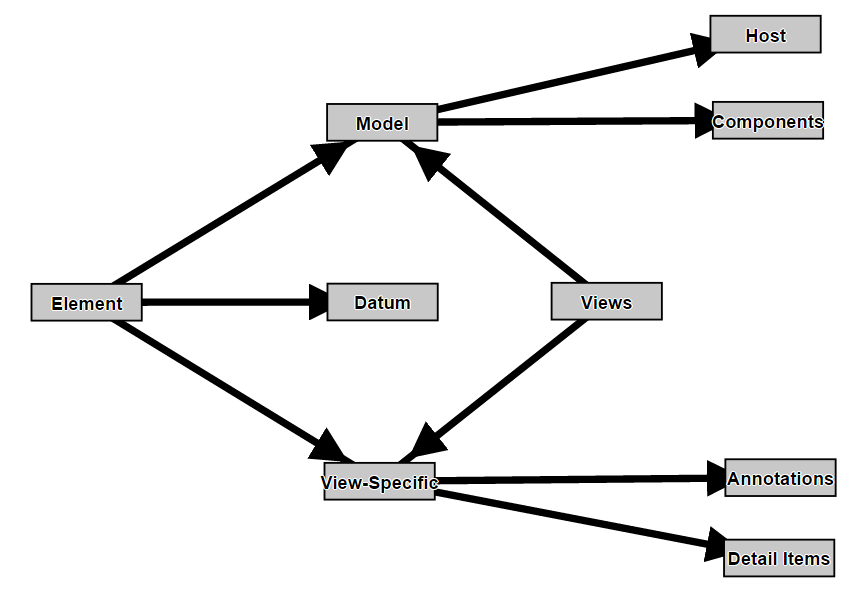
Views
Views allow accessing and documenting the information contained in the model.
Views also link model objects and view-specific objects. Let´s say that Model objects simply exist in model, but view specific objects exist ONLY in the VIEWS in which they are placed, showing the information contained in model or completing it.
Examples:
- Plan views
- Sections
- 3D views
- Schedules
The Revit hierarchy
All objects in Revit, no matter if model, datums, view-specific or views are governed by the same logic, by the same hierarchy of elements as described in the image below:
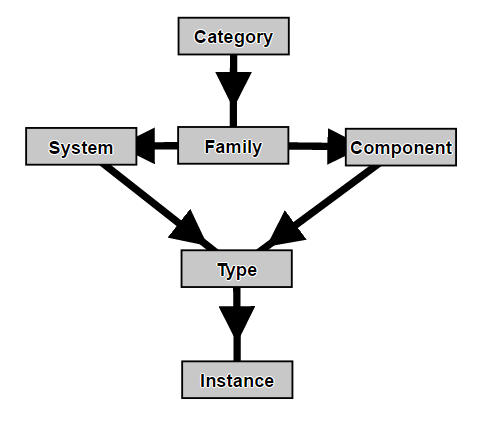
A hierarchy where every object accommodates or responds to 4 part breakdown:
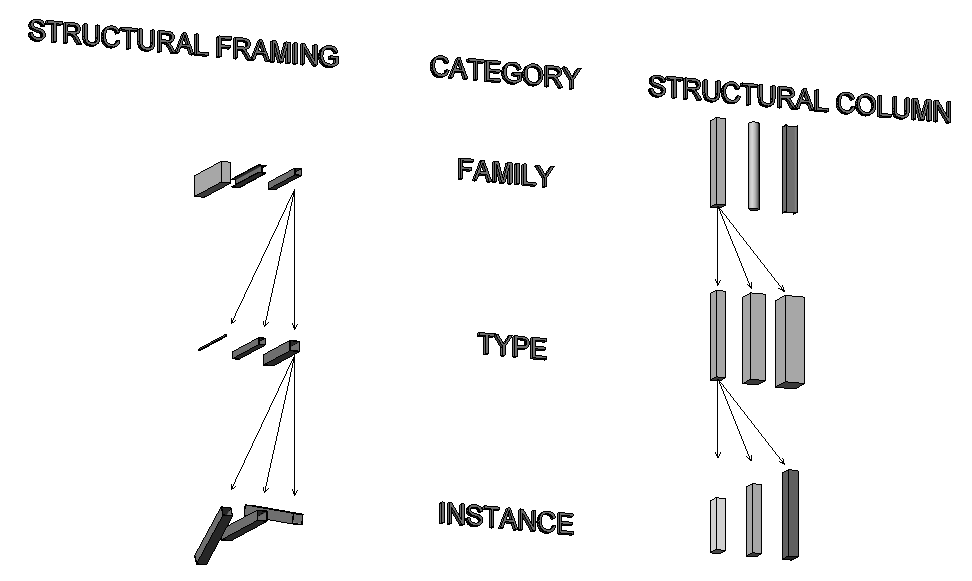
Category
A predefined list of classifications under which all elements within Revit fall. Every element in Revit must belong to a category. The list of Categories is fixed in the software, can not be created nor deleted.
User changes of entire categories will be related to graphical appearance.
Family
Everything in Revit belongs to a Family. Each Family is a class of element belonging to a particular Category and representing a particular physical item or organization concept within a project. Families include two major types:
- System Families are those whose definition, geometry, behaviors and characteristics are pre-defined in the software and cannot be changed by the user.
- Component Families are those whose definition, geometry, behaviors and characteristics can be created and edited by the user.
There are both System and Component Families for Model, Annotation and Detail element types.
Type
A saved and named variation of a Family usually based upon standard sizes or other commonly recognized characteristics.
Instance
An actual physical element within the model or project. Depending on the definition of the Category and Family, an instance can have unique properties not governed by the Type.
Conclusion
The first step to working in Revit in general and building Families in specific is to become comfortable with this list of terms.
It will help the user to understand what to change when editing the model and what impact will the edition have.
How do these hierarchies apply to Levels and Reference Planes?
I am learning Dynamo in Revit and an understanding of hierarchies would be really helpful.
Is a Level a Category?
Then is Level 3 an Instance?
Are Reference Planes a Category?
Then a Reference Plane that I placed and named is an Instance?
If so how did these two examples skip the other hierarchical steps?
Thanks!!
Hi Rachel.
You can apply this hierarchy also in levels and reference planes. Levels is a “Category”, you can create “System Families” with their definition, geometry, behaviours and characteristics pre-defined in the software, you cannot edit them, levels are always created the same way, then you have types, you can create, for example, architectural levels and structural ones with different bubble types or colors, and then you have instances that you can place with a specific scope (via scope boxes) and elevation and name them according to your preferences, the same is applied to reference planes but with the difference that you can place them in other direction instead of horizontally.
Regards